

Your graphics add a nice touch to my presentations and I recently used them for one of my all-hands meetings. Your toolbox adds professionalism to my slides. Instead of using standard clipart.
Claude Jones, Director of Engineer, @Walmartlabs, USA

Your graphics add a nice touch to my presentations and I recently used them for one of my all-hands meetings. Your toolbox adds professionalism to my slides. Instead of using standard clipart.
Claude Jones, Director of Engineer, @Walmartlabs, USA
I needed a fresh look at some of my slides. I've tried to find a way to create a paintbrush effect, to underline, accentuate, add some color and the handwritten markers were just the things. Very easy to use, easy to size, change the color. It was an affordable, perfect solution and I'm happy to recommend it.
Anonymous, US
The crisp, clean look of the graphics, and the fact that it allowed me to easily edit and change the colors to match the template was my main reason for purchasing them.
Brandie Jenkins, E-learning Developer, USA
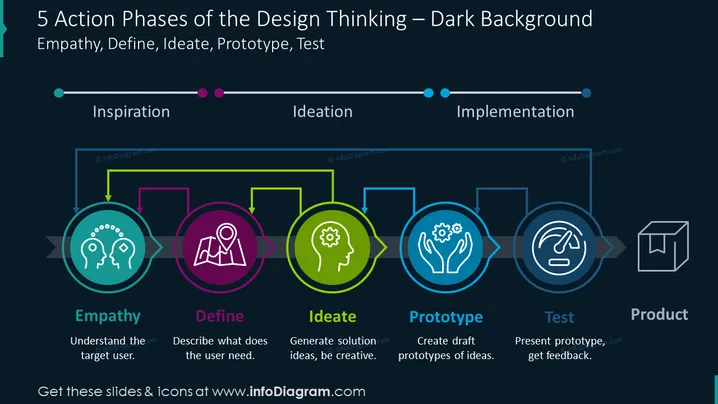
La diapositiva ilustra las etapas del design thinking: Empatía, Definir, Idear, Prototipar y Probar, que conducen al Producto final. La empatía se centra en entender al usuario objetivo. Definir ayuda a describir las necesidades del usuario. Idear es donde se generan ideas de solución y se fomenta la creatividad. Prototipar es la fase de crear borradores de ideas. Probar implica presentar el prototipo y obtener retroalimentación, todo contribuyendo al desarrollo del Producto final.
La diapositiva tiene un aspecto profesional y moderno, utilizando codificación de colores e íconos simples para organizar visualmente la información. El diseño armoniza la iconografía con breves descripciones textuales, asegurando claridad y enfoque en el flujo del proceso.



