
Your graphics add a nice touch to my presentations and I recently used them for one of my all-hands meetings. Your toolbox adds professionalism to my slides. Instead of using standard clipart.
Claude Jones, Director of Engineer, @Walmartlabs, USA
Your graphics add a nice touch to my presentations and I recently used them for one of my all-hands meetings. Your toolbox adds professionalism to my slides. Instead of using standard clipart.
Claude Jones, Director of Engineer, @Walmartlabs, USA
I needed a fresh look at some of my slides. I've tried to find a way to create a paintbrush effect, to underline, accentuate, add some color and the handwritten markers were just the things. Very easy to use, easy to size, change the color. It was an affordable, perfect solution and I'm happy to recommend it.
Anonymous, US
The crisp, clean look of the graphics, and the fact that it allowed me to easily edit and change the colors to match the template was my main reason for purchasing them.
Brandie Jenkins, E-learning Developer, USA
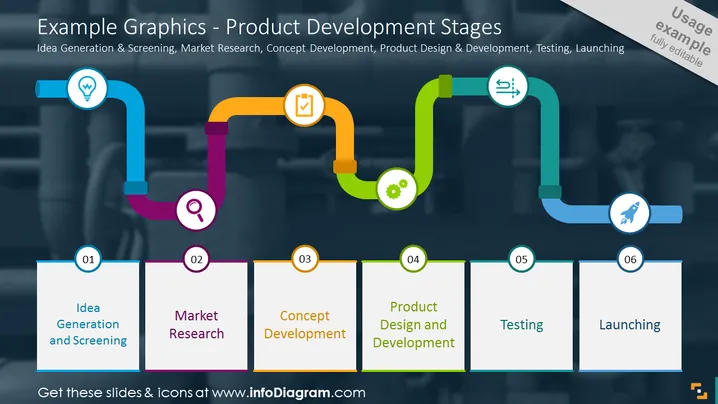
La diapositiva presenta las "Etapas del Desarrollo de Productos," comenzando con "Generación y Filtrado de Ideas," que consiste en concebir nuevas ideas de productos y filtrar aquellas factibles. La siguiente etapa es "Investigación de Mercado," que implica recopilar datos sobre las necesidades y preferencias de los consumidores. Esto es seguido por "Desarrollo del Concepto," donde la idea se convierte en un plan de producto viable. La fase de "Diseño y Desarrollo del Producto" implica crear los prototipos y diseños para la producción. "Pruebas" es donde el producto se somete a rigurosas verificaciones de calidad y rendimiento. Finalmente, "Lanzamiento" representa la introducción del producto al mercado.




