

Your graphics add a nice touch to my presentations and I recently used them for one of my all-hands meetings. Your toolbox adds professionalism to my slides. Instead of using standard clipart.
Claude Jones, Director of Engineer, @Walmartlabs, USA

Your graphics add a nice touch to my presentations and I recently used them for one of my all-hands meetings. Your toolbox adds professionalism to my slides. Instead of using standard clipart.
Claude Jones, Director of Engineer, @Walmartlabs, USA
I needed a fresh look at some of my slides. I've tried to find a way to create a paintbrush effect, to underline, accentuate, add some color and the handwritten markers were just the things. Very easy to use, easy to size, change the color. It was an affordable, perfect solution and I'm happy to recommend it.
Anonymous, US
The crisp, clean look of the graphics, and the fact that it allowed me to easily edit and change the colors to match the template was my main reason for purchasing them.
Brandie Jenkins, E-learning Developer, USA
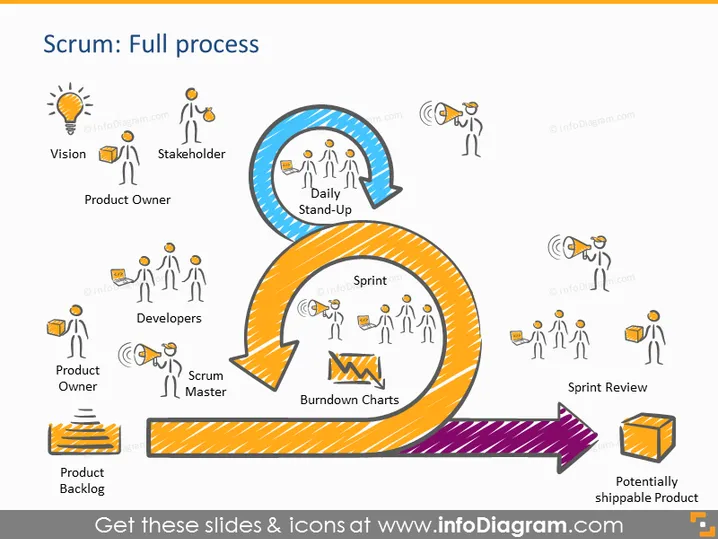
Esta diapositiva de PowerPoint representa visualmente el marco de Scrum, detallando su flujo desde la concepción hasta la finalización. Al principio, un ícono de bombilla etiquetado como "Visión" significa el inicio de una idea. "Interesados" y "Propietario del Producto" vienen a continuación, representando a quienes son responsables de la visión. El "Encuentro Diario" es una flecha circular que destaca las verificaciones regulares del equipo. Los "Desarrolladores," "Scrum Master," y "Gráficas de Progreso" indican la fase activa de trabajo, con el Scrum Master facilitando y las Gráficas de Progreso rastreando el progreso. El proceso termina con una "Revisión del Sprint" y un "Producto potencialmente entregable," sugiriendo un ciclo listo para repetirse para la mejora continua.



