

Your graphics add a nice touch to my presentations and I recently used them for one of my all-hands meetings. Your toolbox adds professionalism to my slides. Instead of using standard clipart.
Claude Jones, Director of Engineer, @Walmartlabs, USA

Your graphics add a nice touch to my presentations and I recently used them for one of my all-hands meetings. Your toolbox adds professionalism to my slides. Instead of using standard clipart.
Claude Jones, Director of Engineer, @Walmartlabs, USA
I needed a fresh look at some of my slides. I've tried to find a way to create a paintbrush effect, to underline, accentuate, add some color and the handwritten markers were just the things. Very easy to use, easy to size, change the color. It was an affordable, perfect solution and I'm happy to recommend it.
Anonymous, US
The crisp, clean look of the graphics, and the fact that it allowed me to easily edit and change the colors to match the template was my main reason for purchasing them.
Brandie Jenkins, E-learning Developer, USA
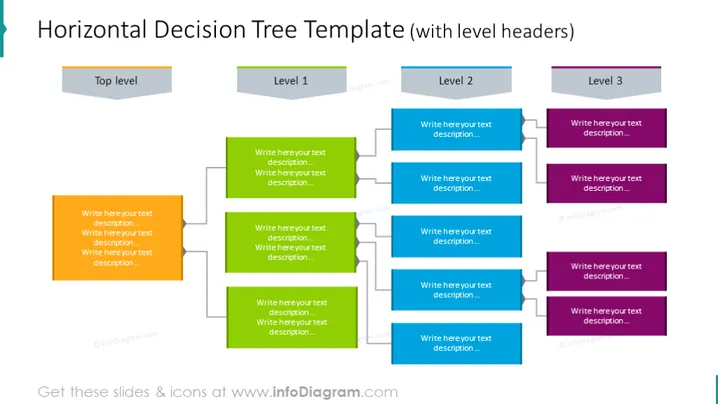
La diapositiva representa un árbol de decisión organizado horizontalmente, significando el proceso de toma de decisiones jerárquica. El "Nivel superior" inicia el árbol, ramificándose en "Nivel 1," que se subdivide a su vez en "Nivel 2" y luego en "Nivel 3," cada uno con espacios para texto descriptivo. Cada nivel exhibe múltiples opciones, implicando la complejidad o la multitud de elecciones que podrían hacerse en cada paso de un proceso de toma de decisiones.
El aspecto general de la diapositiva es profesional, con una jerarquía visual clara enfatizada por la codificación de colores y líneas limpias. La organización facilita la comprensión de procesos de toma de decisiones complejos o estructuras organizativas.



