

Your graphics add a nice touch to my presentations and I recently used them for one of my all-hands meetings. Your toolbox adds professionalism to my slides. Instead of using standard clipart.
Claude Jones, Director of Engineer, @Walmartlabs, USA

Your graphics add a nice touch to my presentations and I recently used them for one of my all-hands meetings. Your toolbox adds professionalism to my slides. Instead of using standard clipart.
Claude Jones, Director of Engineer, @Walmartlabs, USA
I needed a fresh look at some of my slides. I've tried to find a way to create a paintbrush effect, to underline, accentuate, add some color and the handwritten markers were just the things. Very easy to use, easy to size, change the color. It was an affordable, perfect solution and I'm happy to recommend it.
Anonymous, US
The crisp, clean look of the graphics, and the fact that it allowed me to easily edit and change the colors to match the template was my main reason for purchasing them.
Brandie Jenkins, E-learning Developer, USA
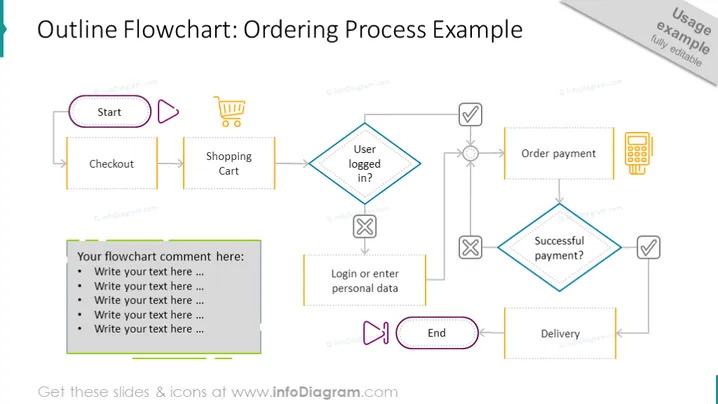
Diese professionell gestaltete Folie präsentiert das Flussdiagramm des Bestellsystems beispielhaft mit Schritten von Anfang bis Ende. Der erste Schritt des Bestellprozesses ist Checkout. Der nächste Schritt ist der Warenkorb, dann wird überprüft, ob der Benutzer eingeloggt ist. Wenn ja - bestellt er die Zahlung, wenn nicht - loggt er sich ein oder gibt eine persönliche Daten ein, um fortzufahren. Wenn die Zahlung erfolgreich ist, wartet der Kunde auf die Lieferung des Produkts, wenn nicht - versucht er es erneut, bis ein erfolgreicher Kauf abgeschlossen ist. Dies ist eine großartige PowerPoint-Präsentation, um den Workflow-Management in Ihrem Unternehmen zu erklären, dank des bearbeitbaren Flussdiagramm- Vektors, der den Bestellprozess schneller beschreibt. Diese Folie ist zum Herunterladen und Bearbeiten in PowerPoint, Google Slides und Keynote verfügbar. ##Folie Infografiken: Rechteckige Textblöcke, Rhombus-Textblöcke, Flache Schaltflächenikone, Einkaufswagen-Symbol, Wiedergabesymbol, Kreuzsymbol, Häkchen- Symbol, Pfeillinienvektor, Pausenspiele-Schaltfläche-Symbol, Zahlungsterminal-Symbol, bearbeitbare Grafiken, transparenter Hintergrund



