
Your graphics add a nice touch to my presentations and I recently used them for one of my all-hands meetings. Your toolbox adds professionalism to my slides. Instead of using standard clipart.
Claude Jones, Director of Engineer, @Walmartlabs, USA
Your graphics add a nice touch to my presentations and I recently used them for one of my all-hands meetings. Your toolbox adds professionalism to my slides. Instead of using standard clipart.
Claude Jones, Director of Engineer, @Walmartlabs, USA
I needed a fresh look at some of my slides. I've tried to find a way to create a paintbrush effect, to underline, accentuate, add some color and the handwritten markers were just the things. Very easy to use, easy to size, change the color. It was an affordable, perfect solution and I'm happy to recommend it.
Anonymous, US
The crisp, clean look of the graphics, and the fact that it allowed me to easily edit and change the colors to match the template was my main reason for purchasing them.
Brandie Jenkins, E-learning Developer, USA
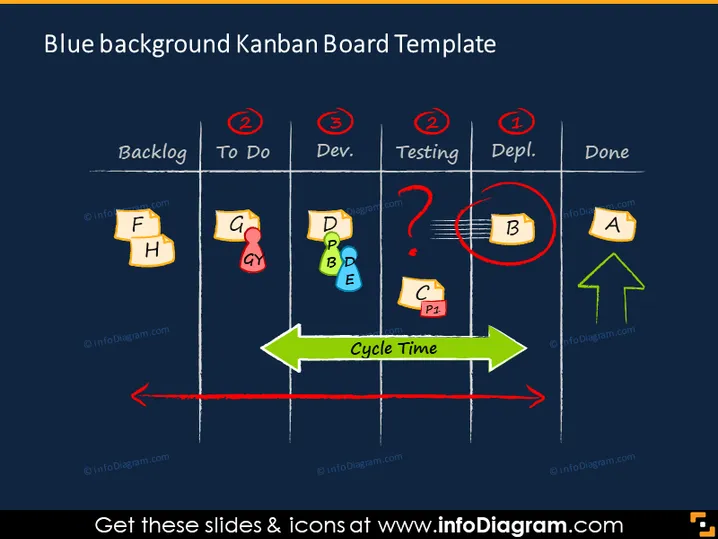
Die Folie zeigt eine Kanban-Board-Vorlage, die zur Verfolgung von Aufgaben in verschiedenen Phasen eines Prozesses verwendet wird. Es gibt fünf Spalten mit den Titeln "Backlog", "To Do", "Entwicklung", "Testing", "Deployment" und "Fertig". Jede enthält farbige Haftnotizgrafiken mit Buchstaben, die Aufgaben signifizieren. Hervorzuhebende Elemente sind rote Kreise mit Zahlen, die die Aufgabenlimits pro Phase anzeigen, und ein grüner "Cycle Time"-Pfeil, der den Prozessfluss darstellt. Die Aufgabe 'B' im "Testing" ist umkreist, was auf einen Engpass oder ein Problem hinweist.
Die Folie hat einen ausgeprägten Farbkontrast mit hellen Elementen auf einem dunklen Hintergrund, und die Verwendung von Haftnotizen und Pfeilen macht sie visuell repräsentativ für ein physisches Kanban-Board.




