
Your graphics add a nice touch to my presentations and I recently used them for one of my all-hands meetings. Your toolbox adds professionalism to my slides. Instead of using standard clipart.
Claude Jones, Director of Engineer, @Walmartlabs, USA
Your graphics add a nice touch to my presentations and I recently used them for one of my all-hands meetings. Your toolbox adds professionalism to my slides. Instead of using standard clipart.
Claude Jones, Director of Engineer, @Walmartlabs, USA
I needed a fresh look at some of my slides. I've tried to find a way to create a paintbrush effect, to underline, accentuate, add some color and the handwritten markers were just the things. Very easy to use, easy to size, change the color. It was an affordable, perfect solution and I'm happy to recommend it.
Anonymous, US
The crisp, clean look of the graphics, and the fact that it allowed me to easily edit and change the colors to match the template was my main reason for purchasing them.
Brandie Jenkins, E-learning Developer, USA
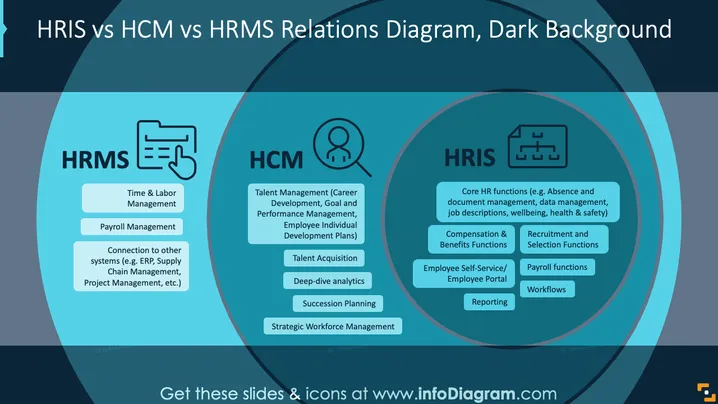
Die PowerPoint-Folie veranschaulicht die Unterschiede zwischen HRIS, HCM und HRMS. HRMS umfasst das Zeit- und Arbeitsmanagement, Lohnabrechnungsdienste und Verbindungen zu anderen Systemen wie ERP und Projektmanagement. HCM deckt Talentmanagement und -akquise, tiefgehende Analysen, Nachfolgeplanung und strategisches Workforce-Management ab. HRIS konzentriert sich auf zentrale HR-Funktionen, Vergütung und Benefits, Rekrutierung, Mitarbeiterportale, Lohnabrechnungsfunktionen, Workflows und Berichterstattung.
Das Design der Folie vermittelt effektiv mehrere komplexe Konzepte durch einfache Formen und Texte. Es nutzt Farbkontrast und Ausrichtung, um eine einfache Lesbarkeit und schnelles Verständnis sicherzustellen.




