

Your graphics add a nice touch to my presentations and I recently used them for one of my all-hands meetings. Your toolbox adds professionalism to my slides. Instead of using standard clipart.
Claude Jones, Director of Engineer, @Walmartlabs, USA

Your graphics add a nice touch to my presentations and I recently used them for one of my all-hands meetings. Your toolbox adds professionalism to my slides. Instead of using standard clipart.
Claude Jones, Director of Engineer, @Walmartlabs, USA
I needed a fresh look at some of my slides. I've tried to find a way to create a paintbrush effect, to underline, accentuate, add some color and the handwritten markers were just the things. Very easy to use, easy to size, change the color. It was an affordable, perfect solution and I'm happy to recommend it.
Anonymous, US
The crisp, clean look of the graphics, and the fact that it allowed me to easily edit and change the colors to match the template was my main reason for purchasing them.
Brandie Jenkins, E-learning Developer, USA
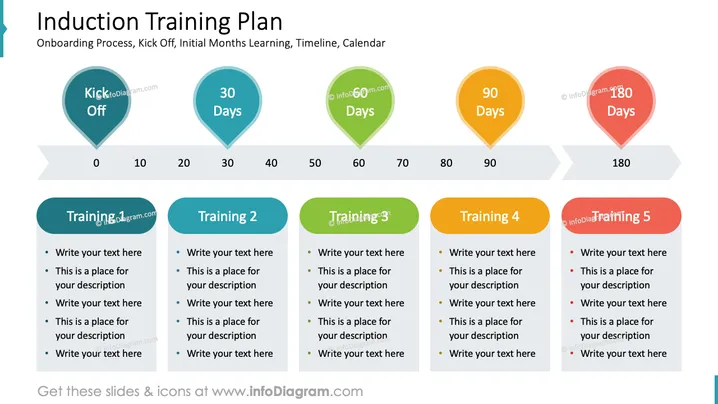
Die Folie mit dem Titel "Einarbeitungsplan" behandelt die Einarbeitung, das anfängliche Lernen und umfasst einen Zeitplan von der Eröffnung bis zu 180 Tagen. Es gibt fünf wichtige Phasen: Kick-Off, 30 Tage, 60 Tage, 90 Tage und 180 Tage. Jeder Zeitpunkt ist mit einer Schulungsveranstaltung verbunden. Die Bezeichnungen "Schulung 1" bis "Schulung 5" sind Platzhalter für spezifische Sitzungsdetails. Jede Schulungsveranstaltung schlägt einen Bereich zum Hinzufügen von Text oder Beschreibungen vor, der an die spezifischen Schulungsmodule und Ziele der Organisation angepasst werden kann.
Die Folie hat ein klares, professionelles Layout, das für Klarheit und Verständnis sorgt. Die Verwendung von farbcodierten Symbolen und Formen hilft, jede Phase des Einarbeitungsplans visuell zu trennen.



