

Your graphics add a nice touch to my presentations and I recently used them for one of my all-hands meetings. Your toolbox adds professionalism to my slides. Instead of using standard clipart.
Claude Jones, Director of Engineer, @Walmartlabs, USA

Your graphics add a nice touch to my presentations and I recently used them for one of my all-hands meetings. Your toolbox adds professionalism to my slides. Instead of using standard clipart.
Claude Jones, Director of Engineer, @Walmartlabs, USA
I needed a fresh look at some of my slides. I've tried to find a way to create a paintbrush effect, to underline, accentuate, add some color and the handwritten markers were just the things. Very easy to use, easy to size, change the color. It was an affordable, perfect solution and I'm happy to recommend it.
Anonymous, US
The crisp, clean look of the graphics, and the fact that it allowed me to easily edit and change the colors to match the template was my main reason for purchasing them.
Brandie Jenkins, E-learning Developer, USA
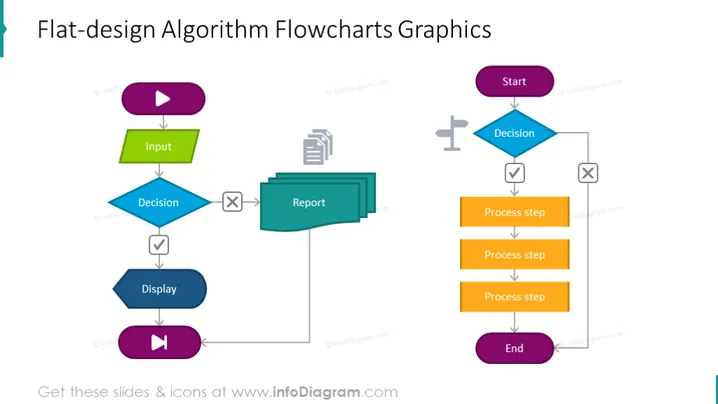
Bevor Sie ein Programm schreiben, wird empfohlen, zunächst ein Verfahren zur Lösung des vorliegenden Problems zu entwickeln. Ein Programm ohne angemessene Vorplanung zu schreiben, kann zu mehr Fehlern führen. Algorithmen und Flussdiagramme sind leistungsstarke Werkzeuge zum Lernen einer Programmiersprache. Ein Algorithmus ist ein schrittweiser Prozess, während ein Flussdiagramm die Schritte eines Programms auf grafische Weise erklärt. Diese Präsentationsfolie des Flussdiagramm-Algorithmus kann Ihnen helfen, alle Schritte zur Problemlösung zu klären. Wenn Sie neu im Programmieren sind, wird geraten, zunächst einen Algorithmus zu schreiben und ein Flussdiagramm zu zeichnen, bevor Sie versuchen, ein Programm zu schreiben. In unserer Folie haben wir den Prozess wie folgt erklärt: eine Entscheidung treffen, dann die Prozessschritte erklären, die den Algorithmus erstellen, und wenn alles erfolgreich ist, beenden. Wenn Sie planen, Ihr Programm zu starten, überprüfen Sie Ihre Eingaben, treffen Sie eine Entscheidung und schreiben Sie einen Bericht darüber, zeigen Sie ihn an und starten Sie ihn dann. Diese Folie ist Teil des PowerPoint-Präsentationsvorlagen-Decks für Flussdiagramme. ##Slide Infografiken Beschreibung: Flaches Design Flussdiagramm Diagramm, Play-Button-Symbol, Parallelogramm-Textbox, rechteckige Textblöcke, Pfeillinien-Vektor, Kreuzsymbol, Häkchen-Symbol, Berichtsymbol, flache graue Umrisssymbole, Straßensymbol, weißer Hintergrund



