

Your graphics add a nice touch to my presentations and I recently used them for one of my all-hands meetings. Your toolbox adds professionalism to my slides. Instead of using standard clipart.
Claude Jones, Director of Engineer, @Walmartlabs, USA

Your graphics add a nice touch to my presentations and I recently used them for one of my all-hands meetings. Your toolbox adds professionalism to my slides. Instead of using standard clipart.
Claude Jones, Director of Engineer, @Walmartlabs, USA
I needed a fresh look at some of my slides. I've tried to find a way to create a paintbrush effect, to underline, accentuate, add some color and the handwritten markers were just the things. Very easy to use, easy to size, change the color. It was an affordable, perfect solution and I'm happy to recommend it.
Anonymous, US
The crisp, clean look of the graphics, and the fact that it allowed me to easily edit and change the colors to match the template was my main reason for purchasing them.
Brandie Jenkins, E-learning Developer, USA
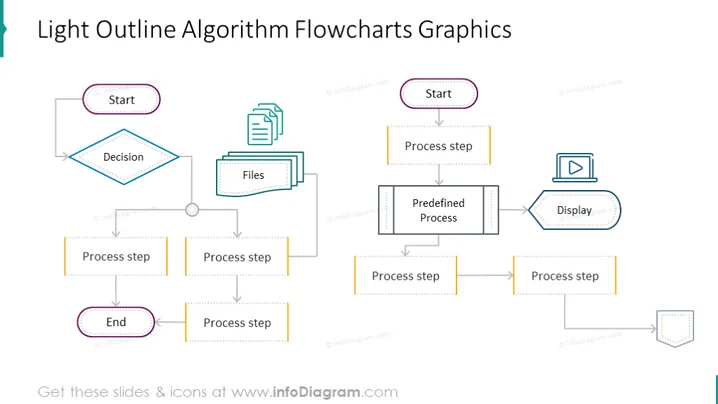
Die Folie zeigt zwei separate Flussdiagramme, die mit Algorithmusprozessen zusammenhängen. Das erste Flussdiagramm beginnt mit einem 'Start'-Knoten, führt zu einem 'Entscheidungs'-Diamanten, verzweigt sich zu einem 'Dateien'-Rechteck, das die Dokumentenbearbeitung anzeigt, und umfasst mehrere 'Prozessschritt'-Knoten, die mit einem 'Ende'-Knoten enden. Das zweite Flussdiagramm beginnt mit einem 'Start'-Knoten, folgt mit einem 'Prozessschritt', bewegt sich zu einem 'Vordefinierten Prozess'-Rechteck und setzt sich durch zusätzliche 'Prozessschritt'-Knoten fort, bevor es zu einer Off-Page-Referenz gelangt, was impliziert, dass der Prozess woanders fortgesetzt wird. Diese Flussdiagramme beschreiben visuell eine Abfolge von Operationen oder Schritten in einem algorithmischen Prozess.



