

Your graphics add a nice touch to my presentations and I recently used them for one of my all-hands meetings. Your toolbox adds professionalism to my slides. Instead of using standard clipart.
Claude Jones, Director of Engineer, @Walmartlabs, USA

Your graphics add a nice touch to my presentations and I recently used them for one of my all-hands meetings. Your toolbox adds professionalism to my slides. Instead of using standard clipart.
Claude Jones, Director of Engineer, @Walmartlabs, USA
I needed a fresh look at some of my slides. I've tried to find a way to create a paintbrush effect, to underline, accentuate, add some color and the handwritten markers were just the things. Very easy to use, easy to size, change the color. It was an affordable, perfect solution and I'm happy to recommend it.
Anonymous, US
The crisp, clean look of the graphics, and the fact that it allowed me to easily edit and change the colors to match the template was my main reason for purchasing them.
Brandie Jenkins, E-learning Developer, USA
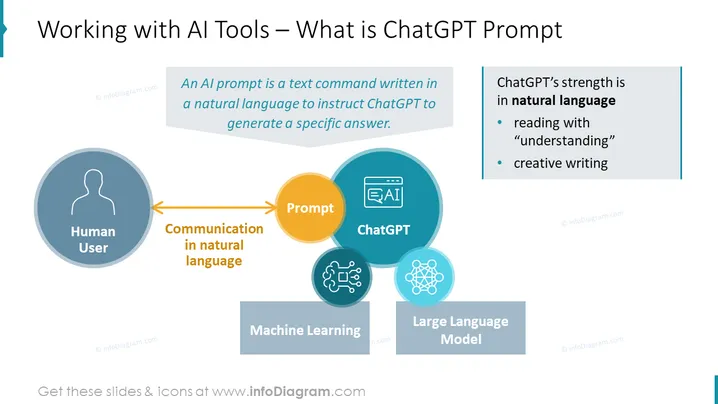
The slide provides an overview of how AI tools like ChatGPT function with prompts. An AI prompt is defined as a text command in natural language that instructs ChatGPT to generate a specific answer. The process involves a human user, communication in natural language that acts as a prompt, then goes to ChatGPT, which is powered by machine learning and a large language model. ChatGPT's strengths include natural language understanding, reading with "understanding", and creative writing. Each component of the process is critical for AI interactions and highlights ChatGPT’s natural language processing capabilities.
The overall look of the slide is clean and professional, with the use of icons and color-coding to effectively illustrate the concept of AI interaction. The visual flow from left to right aids in understanding the sequence of steps in communicating with an AI tool ### Use Cases



