Reviews
Your graphics add a nice touch to my presentations and I recently used them for one of my all-hands meetings. Your toolbox adds professionalism to my slides. Instead of using standard clipart.
I needed a fresh look at some of my slides. I've tried to find a way to create a paintbrush effect, to underline, accentuate, add some color and the handwritten markers were just the things. Very easy to use, easy to size, change the color. It was an affordable, perfect solution and I'm happy to recommend it.
The crisp, clean look of the graphics, and the fact that it allowed me to easily edit and change the colors to match the template was my main reason for purchasing them.
Description
Wellbeing and Engagement Stage
Slide Content
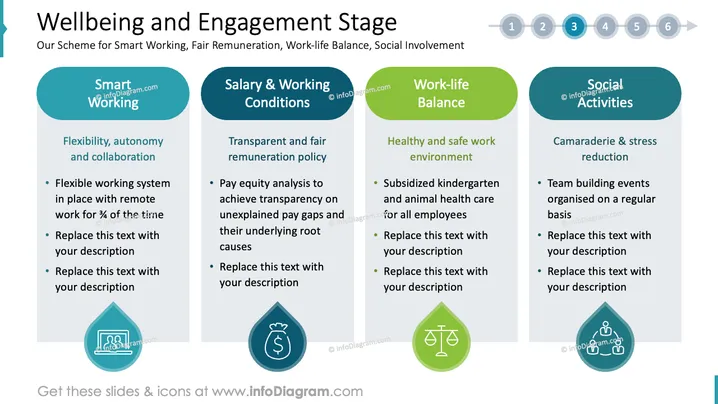
The slide titled "Wellbeing and Engagement Stage" outlines a scheme for Smart Working, Fair Remuneration, Work-life Balance, and Social Involvement. It includes four main components:
- Smart Working: This area emphasizes flexibility, autonomy, and collaboration, with a flexible system allowing for remote work.
- Salary & Working Conditions: Focuses on transparent and fair remuneration policy including pay equity analysis to uncover pay disparities.
- Work-life Balance: Promotes a healthy and safe work environment through benefits like subsidized childcare for employees.
- Social Activities: Encourages camaraderie and stress reduction with regular team-building events.
Graphical Look
- The slide features four vertical sections, each with a colored header and icon: teal for Smart Working, blue for Salary, green for Balance, and teal again for Social Activities.
- Each section contains bulleted text explaining its concept, with a placeholder for custom text.
- Circular icons at the bottom of each section represent the concepts: people at a computer, money bag, balance scale, and people in a circle.
- There is a numbered progress indicator at the top in circular nodes (1 to 6), with the third node highlighted, indicating the current topic's position in a series.
- The layout is clean and structured, with colors used to distinguish different sections.
The overall slide design is professional and organized, with a clear visual hierarchy supported by color coding and symbols, which convey the themes effectively.
Use Cases
- Presenting employee engagement strategies during a corporate meeting.
- Introducing HR policies related to workplace flexibility and benefits.
- Highlighting company initiatives in a recruitment presentation.
- Sharing best practices at a business conference on employee wellbeing.
How to Edit
How to edit text & colors

How to expand / shorten diagram

How to Replace Icons in infoDiagram PPT


