Reviews
Your graphics add a nice touch to my presentations and I recently used them for one of my all-hands meetings. Your toolbox adds professionalism to my slides. Instead of using standard clipart.
I needed a fresh look at some of my slides. I've tried to find a way to create a paintbrush effect, to underline, accentuate, add some color and the handwritten markers were just the things. Very easy to use, easy to size, change the color. It was an affordable, perfect solution and I'm happy to recommend it.
The crisp, clean look of the graphics, and the fact that it allowed me to easily edit and change the colors to match the template was my main reason for purchasing them.
Description
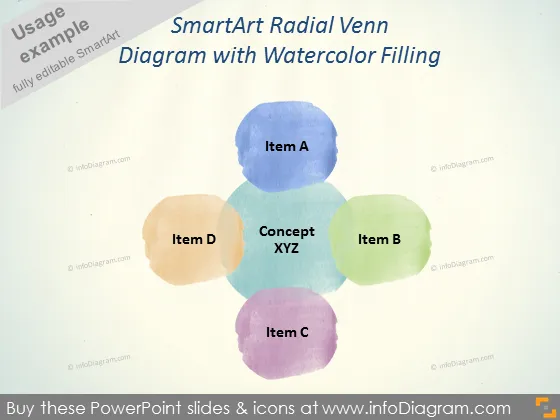
SmartArt Radial Venn Diagram with Watercolor Filling
Slide Content
The slide displays a SmartArt Radial Venn Diagram, which is a graphical tool that depicts all possible logical relations between a finite collection of different sets. It specifically demonstrates the overlap between four distinct items: A, B, C, and D, centering around the "Concept XYZ," to indicate areas of synergy or commonality. This visual can be useful for showing how different concepts or entities come together around a central idea.
Graphical Look
- The slide background is a textured beige color, giving it a paper-like appearance.
- In the center of the slide is a Radial Venn Diagram made up of four overlapping circles.
- Each circle has a different pastel watercolor fill (blue, green, orange, and purple) to distinguish the items.
- The central concept ("Concept XYZ") is shown in bold, with each item ("Item A", "Item B", "Item C", "Item D") placed in its respective circle.
- The font used for the text is sans-serif, which enhances readability.
The overall look of the slide is artistic and visually appealing due to the watercolor effect, yet it remains professional and clear in its depiction of a conceptual model.
Use Cases
- Illustrating the intersection of project components in business meetings.
- Explaining the relationship between different departments or teams in an organizational presentation.
- Highlighting common features of various products or services in a marketing strategy meeting.
- Demonstrating how various research topics or themes overlap in an educational or academic context.
How to Edit
How to edit text & colors

How to expand / shorten diagram

How to Replace Icons in infoDiagram PPT


