Reviews
Your graphics add a nice touch to my presentations and I recently used them for one of my all-hands meetings. Your toolbox adds professionalism to my slides. Instead of using standard clipart.
I needed a fresh look at some of my slides. I've tried to find a way to create a paintbrush effect, to underline, accentuate, add some color and the handwritten markers were just the things. Very easy to use, easy to size, change the color. It was an affordable, perfect solution and I'm happy to recommend it.
The crisp, clean look of the graphics, and the fact that it allowed me to easily edit and change the colors to match the template was my main reason for purchasing them.
Description
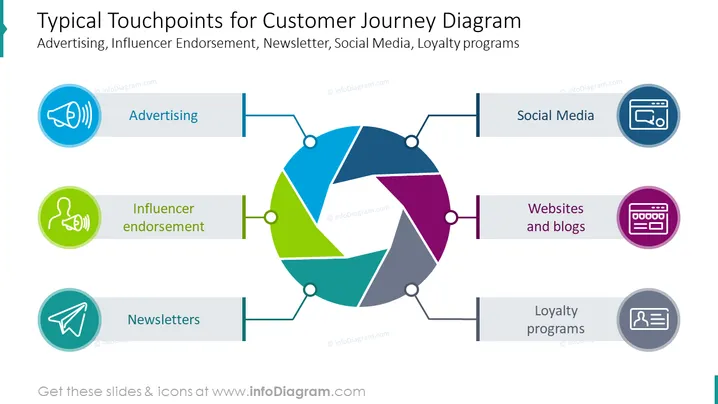
Typical Touchpoints for Customer Journey Diagram
Slide Content:
The slide is a visual representation of the common touchpoints in a customer's journey with a brand. It identifies Advertising, Influencer Endorsement, Newsletters, Social Media, Websites and Blogs, and Loyalty Programs as key interaction points. These touchpoints are crucial for businesses to engage with customers at various stages, from creating awareness to fostering loyalty and encouraging advocacy.
Graphical Look:
- A central circular diagram with segments connected to different touchpoints.
- Colored icons representing each touchpoint: a megaphone for Advertising, a speaking figure for Influencer - Endorsement, a paper airplane for Newsletters, a social media symbol, a browser window for Websites and Blogs, and a loyalty card for Loyalty Programs.
- Horizontal lines connecting the icons to the circular diagram.
- Each touchpoint label is accompanied by a colored bar matching the icon.
- The background of the slide is white, highlighting the colorful diagram and icons.
The overall design is clean and modern, with a central diagram that effectively draws the eye to the various customer touchpoints. The use of distinct colors and clear icons facilitates easy recognition of each touchpoint's role in the customer journey.
Use Cases:
This slide would be effectively utilized in marketing strategy meetings, customer experience workshops, and digital marketing seminars. It could also be used to brief teams on customer engagement strategies or in presentations to stakeholders to illustrate the importance of integrated marketing communications.
How to Edit
How to edit text & colors

How to expand / shorten diagram

How to Replace Icons in infoDiagram PPT


