Reviews
Sus gráficos añaden un toque agradable a mis presentaciones y recientemente los usé para una de mis reuniones generales. Su conjunto de herramientas añade profesionalismo a mis diapositivas. En lugar de usar imágenes prediseñadas estándar.
Necesitaba un aspecto fresco para algunas de mis diapositivas. Había intentado encontrar una forma de crear un efecto de pincel, de subrayar, acentuar, añadir algo de color y los marcadores escritos a mano fueron justo lo que necesitaba. Muy fácil de usar, fácil de ajustar el tamaño, cambiar el color. Fue una solución asequible y perfecta, y estoy feliz de recomendarla.
El aspecto nítido y limpio de los gráficos, y el hecho de que me permitiera editar y cambiar fácilmente los colores para que coincidieran con la plantilla fue mi principal razón para comprarlos.
Description
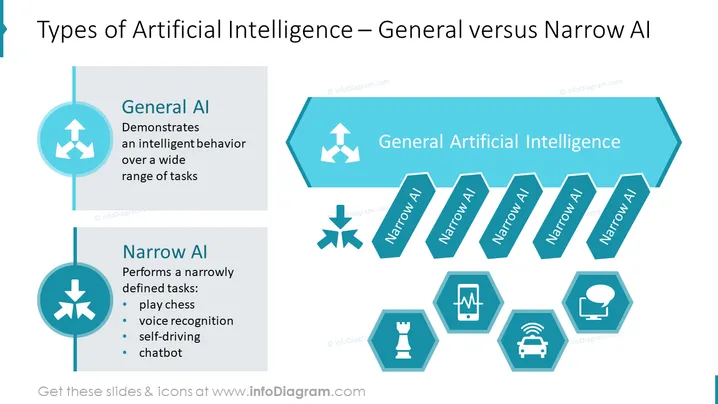
Types of Artificial Intelligence – General versus Narrow AI
Slide Content
The slide compares General AI and Narrow AI, with General AI described as demonstrating intelligent behavior over a wide range of tasks, implying versatility and adaptability. Narrow AI is detailed as performing narrowly defined tasks like playing chess, indicating specialization in specific areas such as voice recognition, self-driving technology, and chatbot interactions. These examples illustrate the focused capabilities of Narrow AI in contrast to the broader scope of General AI.
Graphical Look
- The slide's background is white.
- Title is in dark text, aligned to the left.
- Two main content areas: a circle connected to a vertical line on the left, presenting General AI and Narrow AI each with icons above the text and bullet lists below.
- On the right, a horizontal arrow points to several hexagons labeled with "Narrow AI."
- Each Narrow AI hexagon is paired with its own icon to represent different applications: chess, heartbeat, car, speech bubble.
- Icons are in white set against teal hexagons.
- The color scheme consists of shades of teal and blue.
- The layout is balanced with a mixture of geometric shapes (circles, hexagons, and arrows).
The slide has a clean, modern look with a clear color scheme that visually distinguishes between General AI and Narrow AI. Icons are used effectively to represent different AI applications.
Use Cases
- Introducing the concept of AI-types in educational or training settings.
- Discussing technological capabilities during business strategy meetings.
- Briefing on AI advancements during tech conferences or seminars.
- Analyzing product features that utilize AI in marketing presentations.
How to Edit
How to edit text & colors

How to expand / shorten diagram

How to Replace Icons in infoDiagram PPT


