Your graphics add a nice touch to my presentations and I recently used them for one of my all-hands meetings. Your toolbox adds professionalism to my slides. Instead of using standard clipart.
Claude Jones, Director of Engineer, @Walmartlabs, USA
Your graphics add a nice touch to my presentations and I recently used them for one of my all-hands meetings. Your toolbox adds professionalism to my slides. Instead of using standard clipart.
Claude Jones, Director of Engineer, @Walmartlabs, USA
I needed a fresh look at some of my slides. I've tried to find a way to create a paintbrush effect, to underline, accentuate, add some color and the handwritten markers were just the things. Very easy to use, easy to size, change the color. It was an affordable, perfect solution and I'm happy to recommend it.
Anonymous, US
The crisp, clean look of the graphics, and the fact that it allowed me to easily edit and change the colors to match the template was my main reason for purchasing them.
Brandie Jenkins, E-learning Developer, USA
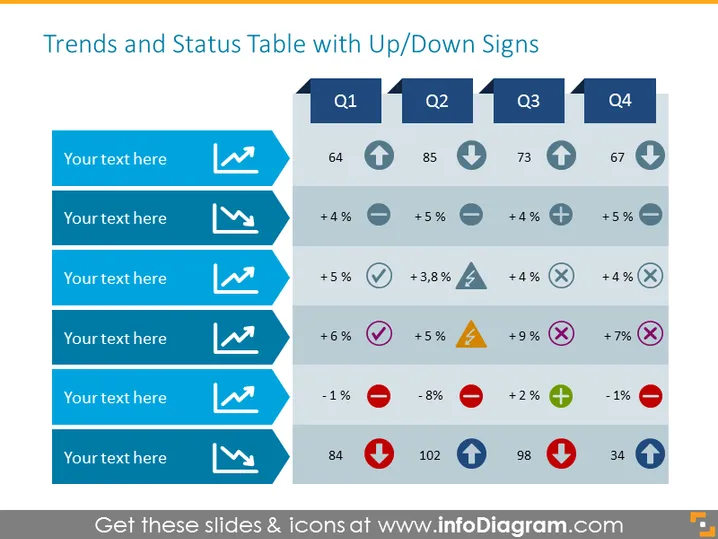
The slide titled "Trends and Status Table with Up/Down Signs" details performance data across four quarters, Q1 through Q4. Each quarter column has an accompanying up or down arrow to indicate a rise or fall in values, signifying performance trends. There are six rows beneath each quarter laminated with blue, each row destined for inserting descriptive text and associated with specific performance metrics such as percentage changes or numerical values. Performance indicators like percentage change often denote growth or reduction, emphasizing the dynamics of a given metric over time.
The overall look of the slide is clean and professional, with a well-organized layout that clearly segregates data through color-coded symbols and arrows, facilitating at-a-glance comprehension of trends and statuses for the presented metrics.




