Reviews
Deine Folien sind meine 'geheime Zutat', wenn es darum geht, meine Ideen Kunden zu visualisieren. Ich spare so viel Zeit.
Ihre Folien führen oft zu guten Kommentaren und Ideen meines Teams, die die endgültigen Folien verbessern.
Description
Train With Carriages – 4 Items List Infographics Template Slide Content:
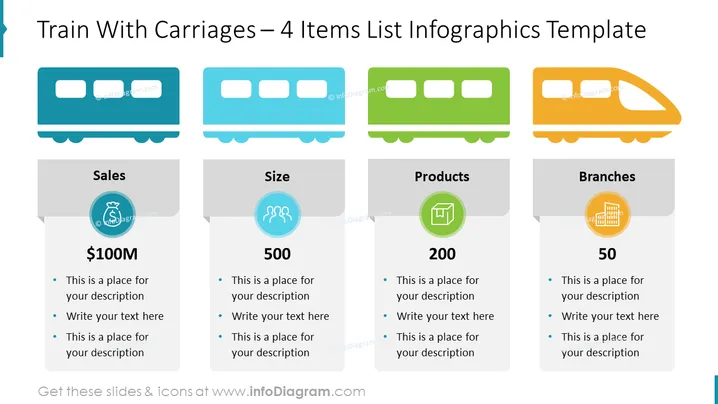
The slide presents a "4 Items List Infographics Template" showcasing a metaphorical train with four carriages to represent different business metrics or categories: "Sales," "Size," "Products," and "Branches." Each carriage features a title, a circular icon with an illustrative graphic (a money bag for "Sales," two people for "Size," a checklist for "Products," and a building facade for "Branches"), a key figure (such as "$100M" for Sales), and bullet points for additional descriptions.
Graphical Look:
- A train of four connected carriages, each with a unique color: blue, teal, green, and orange.
- Each carriage is paired with a corresponding rectangular text box that contains the category title and details.
- Circular icons with simple graphics are placed above the category titles within the text boxes.
- The icons are color-coordinated with their respective carriages and have related symbols within them.
- Key figures are prominently displayed below each icon in large, bold font.
- There are three bullet points below the key figures for adding specific descriptions or data.
The slide has a clean, modern design with a playful twist using the train illustration to represent a progression of business concepts. The color coding and simple icons make for easy identification and separation of the categories.
Use Cases:
- Presenting quarterly business results in a visually engaging format.
- Illustrating the growth stages of a product or company using the train and carriage metaphor.
- Breaking down key components of a strategic plan or project into distinct, manageable sections.
- Using in educational settings to teach about business structures or economics through visual metaphors.
How to Edit
How to edit text & colors

How to expand / shorten diagram

How to Replace Icons in infoDiagram PPT


