Reviews
Sus gráficos añaden un toque agradable a mis presentaciones y recientemente los usé para una de mis reuniones generales. Su conjunto de herramientas añade profesionalismo a mis diapositivas. En lugar de usar imágenes prediseñadas estándar.
Necesitaba un aspecto fresco para algunas de mis diapositivas. Había intentado encontrar una forma de crear un efecto de pincel, de subrayar, acentuar, añadir algo de color y los marcadores escritos a mano fueron justo lo que necesitaba. Muy fácil de usar, fácil de ajustar el tamaño, cambiar el color. Fue una solución asequible y perfecta, y estoy feliz de recomendarla.
El aspecto nítido y limpio de los gráficos, y el hecho de que me permitiera editar y cambiar fácilmente los colores para que coincidieran con la plantilla fue mi principal razón para comprarlos.
Description
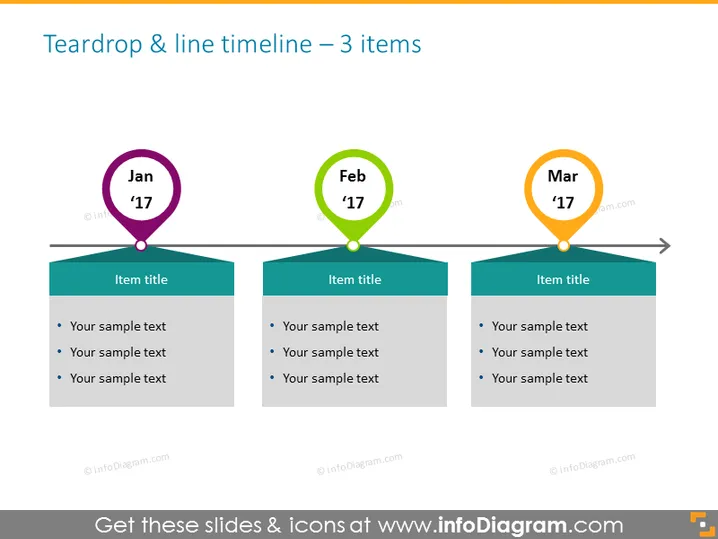
Teardrop & line timeline – 3 items
Slide Content
The slide displays a horizontal timeline with three key milestones, each represented by a contrasting colored teardrop shape and a corresponding month and year label—Jan '17, Feb '17, and Mar '17. Under each teardrop is a banner with the placeholder text "Item title," which suggests where a specific event or milestone title can be inserted. Below each title are bullet points for additional details—three sample text lines indicate where more information about each milestone can be explicated.
Graphical Look
- The slide background is white, providing a clean canvas for the content.
- Three horizontal teardrop shapes, each with a unique color—purple, green, and orange—are aligned in a row.
- Each teardrop has a white text box with a capitalized abbreviation of a month followed by '17, signifying the year.
- A gray horizontal line connects all teardrops, indicating a timeline progression.
- Below each teardrop, a colored banner matches the teardrop's color, with placeholder text "Item title."
- Three bullet points are underneath each banner for additional textual content.
- Arrowheads at the ends of the timeline suggest continuation beyond the displayed items.
The overall look of the slide is clean, modern, and easy to follow. The use of bright colors and distinctive shapes effectively draws the viewer's attention to each timeline event.
Use Cases
- To present a project's phase completion timeline during a business or team meeting.
- For visually tracking milestones in a marketing campaign's development.
- To highlight key historical events or achievements in a company's quarterly review.
- As an educational visual aid to outline major points in a lesson or a series of events within a given timeframe.
How to Edit
How to edit text & colors

How to expand / shorten diagram

How to Replace Icons in infoDiagram PPT


