

Your graphics add a nice touch to my presentations and I recently used them for one of my all-hands meetings. Your toolbox adds professionalism to my slides. Instead of using standard clipart.
Claude Jones, Director of Engineer, @Walmartlabs, USA

Your graphics add a nice touch to my presentations and I recently used them for one of my all-hands meetings. Your toolbox adds professionalism to my slides. Instead of using standard clipart.
Claude Jones, Director of Engineer, @Walmartlabs, USA
I needed a fresh look at some of my slides. I've tried to find a way to create a paintbrush effect, to underline, accentuate, add some color and the handwritten markers were just the things. Very easy to use, easy to size, change the color. It was an affordable, perfect solution and I'm happy to recommend it.
Anonymous, US
The crisp, clean look of the graphics, and the fact that it allowed me to easily edit and change the colors to match the template was my main reason for purchasing them.
Brandie Jenkins, E-learning Developer, USA
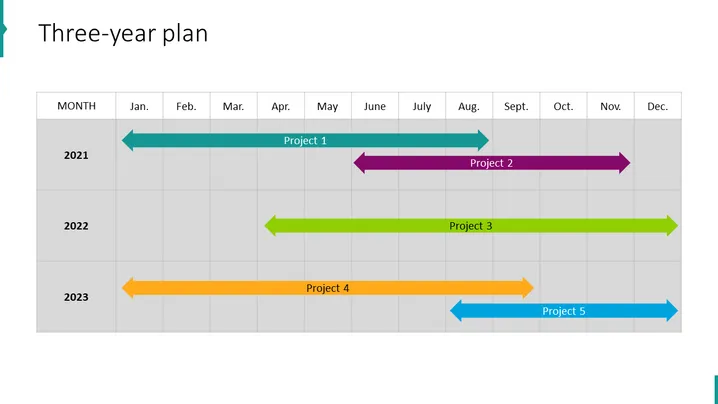
The slide titled "Three-year plan" is a visual representation of a timeline showcasing the duration and sequence of projects over three years. The slide lists months horizontally with years stacked vertically, demonstrating the start and end points of five distinct projects. "Project 1" spans nearly an entire year, indicating a long-term initiative, while "Project 2" appears shorter, suggesting a more concentrated effort. "Project 3" extends across two years, highlighting an ongoing or phased project. "Project 4" and "Project 5" are scheduled for the final year, with "Project 4" starting earlier and "Project 5" concluding the plan, each with their distinct timelines.
The slide uses a clean and professional design with a straightforward structure that enables immediate recognition of the timeframe and project durations.



