Reviews
Your graphics add a nice touch to my presentations and I recently used them for one of my all-hands meetings. Your toolbox adds professionalism to my slides. Instead of using standard clipart.
I needed a fresh look at some of my slides. I've tried to find a way to create a paintbrush effect, to underline, accentuate, add some color and the handwritten markers were just the things. Very easy to use, easy to size, change the color. It was an affordable, perfect solution and I'm happy to recommend it.
The crisp, clean look of the graphics, and the fact that it allowed me to easily edit and change the colors to match the template was my main reason for purchasing them.
Description
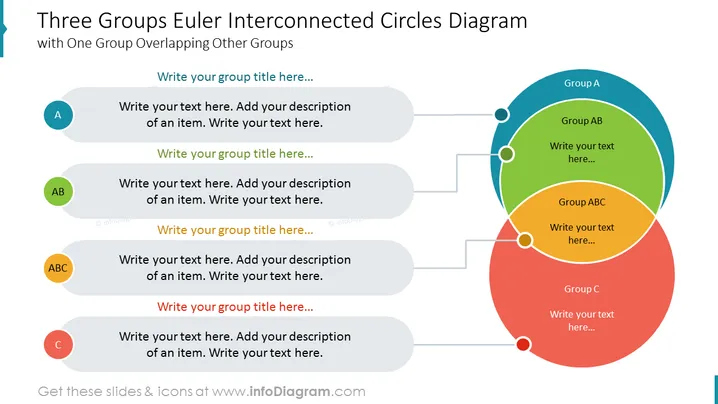
Three Groups Euler Interconnected Circles Diagram
Slide Content
This PowerPoint slide, titled "Three Groups Euler Interconnected Circles Diagram", showcases a Venn diagram with three overlapping circles, each representing a unique group A, B, and C. In the intersections where these groups overlap, there are areas for groups AB and ABC, signifying shared characteristics or relationships. The slide has placeholders for the title of each group and accompanying descriptions, allowing the presenter to specify the nature of these groups and their interconnections.
Graphical Look
- The slide background is white with a teal banner on the left side where the slide title is presented in dark grey and red font.
- Three large overlapping circles in blue, green, and red represent groups A, B, and C respectively.
- The overlapping areas are shaded differently to represent intersections of groups AB and ABC, with a distinct overlap color.
- Each group circle has an adjacent circle with a lighter fill and a letter label (A, AB, C) indicating the group’s identity.
- Six grey text boxes with drop shadow effects float adjacent to each labeled circle for group titles and descriptions.
- The text boxes for group titles are connected to their respective identity circles with a solid line.
- The design balances the color-coded circles on the right with descriptions on the left.
The overall look of the slide is clean and modern, utilizing colors and shapes to distinctly convey the concept of interconnected groups. The layout provides a structured yet visually appealing way to dissect and explain relationships within a dataset or concept.
Use Cases
- Explaining the interconnectedness of different departments or teams within a company.
- Illustrating customer segmentation where different groups might share common characteristics.
- Demonstrating the relationships among various product features or services.
- Presenting research data where overlap in variables or categories occur.
How to Edit
How to edit text & colors

How to expand / shorten diagram

How to Replace Icons in infoDiagram PPT


