Reviews
Your graphics add a nice touch to my presentations and I recently used them for one of my all-hands meetings. Your toolbox adds professionalism to my slides. Instead of using standard clipart.
I needed a fresh look at some of my slides. I've tried to find a way to create a paintbrush effect, to underline, accentuate, add some color and the handwritten markers were just the things. Very easy to use, easy to size, change the color. It was an affordable, perfect solution and I'm happy to recommend it.
The crisp, clean look of the graphics, and the fact that it allowed me to easily edit and change the colors to match the template was my main reason for purchasing them.
Description
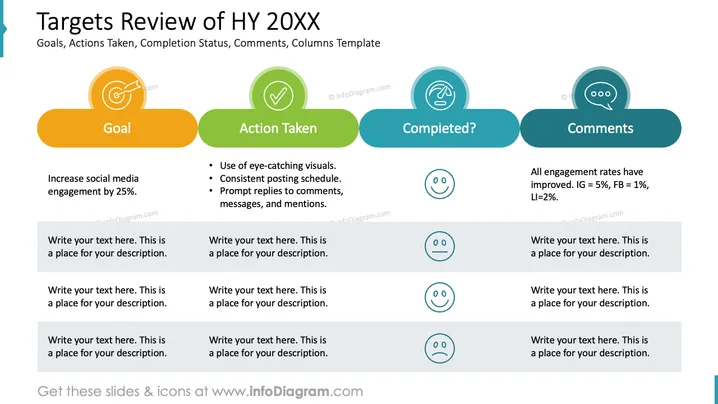
Targets Review of HY 20XX
Slide Content
The slide titled "Targets Review of HY 20XX" outlines a mid-year review focusing on goals, actions taken, completion status, and comments. The first column, 'Goal', lists a specific objective to increase social media engagement by 25%. 'Action Taken' details methods such as using eye-catching visuals and maintaining a consistent posting schedule. 'Completed?' is a checkpoint with emoticon scales indicating progress, and 'Comments' provides a summary of the results, noting improvements in engagement rates across various social platforms like Instagram, Facebook, and LinkedIn.
Graphical Look
- The slide background is white, with four distinct columns.
- Each column has a unique title placed inside a colored cloud-shaped banner - orange, green, teal, and navy.
- Icons represent each header - a target for 'Goal', a check mark for 'Action Taken', a hand with a finger touching for 'Completed?', and a speech bubble for 'Comments'.
- The 'Goal' section includes a text box with a placeholder for supplemental descriptions.
- The 'Action Taken' section lists three bullet points with further description placeholders beneath.
- The 'Completed?' section has a set of emoticons - a sad face, a neutral face, and a happy face - each followed by space for additional text.
- The 'Comments' column contains a summary statement and space for further elaboration.
The slide's design is clean and modern, with a clear division of sections and a balance of icons, colors, and text that enhances readability.
Use Cases
- Presenting quarterly or semi-annual reviews to stakeholders or team members to discuss project progress.
- Delivering strategic planning updates in management meetings or boardroom discussions.
- Visualizing business goals and their execution status in corporate training or internal communication materials.
- Using in performance review presentations to illustrate individual or team achievements and areas for improvement.
How to Edit
How to edit text & colors

How to expand / shorten diagram

How to Replace Icons in infoDiagram PPT


