

Your graphics add a nice touch to my presentations and I recently used them for one of my all-hands meetings. Your toolbox adds professionalism to my slides. Instead of using standard clipart.
Claude Jones, Director of Engineer, @Walmartlabs, USA

Your graphics add a nice touch to my presentations and I recently used them for one of my all-hands meetings. Your toolbox adds professionalism to my slides. Instead of using standard clipart.
Claude Jones, Director of Engineer, @Walmartlabs, USA
I needed a fresh look at some of my slides. I've tried to find a way to create a paintbrush effect, to underline, accentuate, add some color and the handwritten markers were just the things. Very easy to use, easy to size, change the color. It was an affordable, perfect solution and I'm happy to recommend it.
Anonymous, US
The crisp, clean look of the graphics, and the fact that it allowed me to easily edit and change the colors to match the template was my main reason for purchasing them.
Brandie Jenkins, E-learning Developer, USA
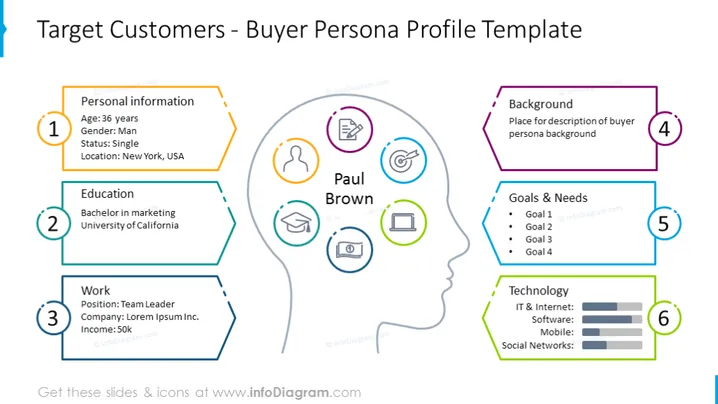
This PowerPoint slide is designed to create a detailed buyer persona profile. It includes six sections to help describe the target customer. Point 1 is "Personal information," which provides the basics like age, gender, marital status, and location. Point 2, "Education," lists academic qualifications. "Work" is the third point, detailing the persona's job title, company, and income. Point 4, "Background," is allocated for additional personal history. The fifth, "Goals & Needs," includes four slots for listing objectives and requirements. Lastly, point 6, "Technology," visually represents the persona's usage of IT, software, mobile, and social networks with bar graphs.
The slide uses a mix of vibrant colors and clear typography to direct viewers' attention to critical sections. The visual design is both informative and visually engaging, with icons and color-coded sections improving comprehension.



