Reviews
Your graphics add a nice touch to my presentations and I recently used them for one of my all-hands meetings. Your toolbox adds professionalism to my slides. Instead of using standard clipart.
I needed a fresh look at some of my slides. I've tried to find a way to create a paintbrush effect, to underline, accentuate, add some color and the handwritten markers were just the things. Very easy to use, easy to size, change the color. It was an affordable, perfect solution and I'm happy to recommend it.
The crisp, clean look of the graphics, and the fact that it allowed me to easily edit and change the colors to match the template was my main reason for purchasing them.
Description
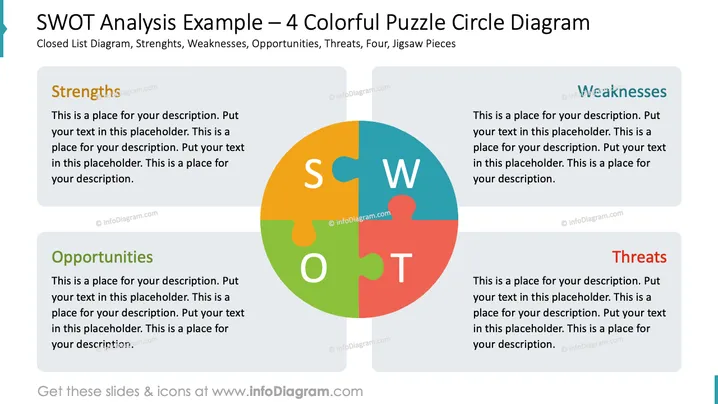
SWOT Analysis Example – 4 Colorful Puzzle Circle Diagram
Slide Content
This PowerPoint slide is titled "SWOT Analysis Example – 4 Colorful Puzzle Circle Diagram" and it is designed to present a SWOT analysis using a puzzle diagram. SWOT stands for Strengths, Weaknesses, Opportunities, and Threats, and this slide has placeholders for each of these elements. Strengths and Weaknesses are often internal factors within an organization, while Opportunities and Threats typically describe external factors that can affect the organization's performance. The slide offers a visual representation of how these four elements are interlocked, like pieces of a puzzle, indicating their interconnected nature in strategic planning.
Graphical Look
- The center of the slide features a large, circular puzzle graphic with four interlocking pieces.
- Each piece of the puzzle represents one element of SWOT and has a distinct color: green for Opportunities, blue for Strengths, red for Weaknesses, and orange for Threats.
- Surrounding the central graphic are four rectangular text boxes with rounded corners, one for each category of SWOT.
- The text boxes have headers that match the colors of the respective puzzle pieces.
- Placeholder text within each box invites the viewer to add a specific description.
- The slide background is white, which creates contrast and makes the colorful elements stand out.
- Each section of the SWOT analysis is clearly distinguished by not only the color coding but also the orientation of the respective text boxes.
- The Strengths and Weaknesses boxes are placed horizontally, while Opportunities and Threats are oriented vertically.
The overall look of the slide is clean and professional with a compelling visual element that intuitively conveys the concept of interconnectedness. The color-coding and placement of text boxes reinforce the distinctions between the elements of SWOT.
Use Cases
- Ideal for strategic planning meetings to visually represent the interrelated aspects of a company's internal and external environment.
- Useful in business or marketing presentations where an analysis of the company's competitive landscape is required.
- Can be applied in educational settings, such as business management classes, to explain the SWOT analysis framework to students.
- Suitable for brainstorming sessions where team members can collectively identify and discuss the strengths, weaknesses, opportunities, and threats facing a project or business initiative.
How to Edit
How to edit text & colors

How to expand / shorten diagram

How to Replace Icons in infoDiagram PPT


