Reviews
Your slides are my "secret sauce" when it comes to presenting my ideas to clients. I save a lot of time.
J'avais un délai de livraison à respecter et je n'avais pas le temps de créer une variété de modèles de diapositives. Infodiagram m'a proposé des options faciles à télécharger et à personnaliser en fonction de mes besoins !
Vos diapositives suscitent souvent de précieux commentaires et idées de la part de mon équipe, ce qui améliore les diapositives finales.
Description
Survey Infographics Template
Slide Content
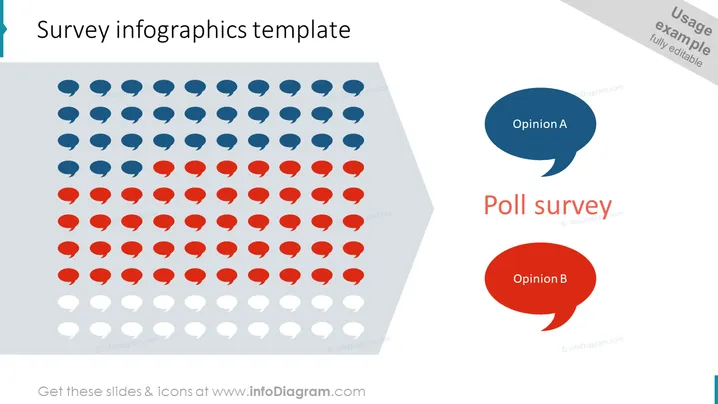
The slide illustrates a poll survey result with a graphical representation of different opinions. Iconic red, blue, and grey speech bubbles depict the distribution of responses across three categories: Opinion A, Opinion B, and a third unspecified category. Opinion A is symbolized by blue speech bubbles, implying a specific viewpoint or choice, while Opinion B is represented by red speech bubbles, indicating an alternative perspective or selection. The grey speech bubbles likely represent either abstentions or a neutral standpoint, filling in the remainder of the response spectrum.
Graphical Look
- A large rectangle tilted to the left with a 3D shadow effect filled with rows of speech bubble icons.
- Speech bubble icons are divided into three colors: blue at the top, red in the middle, and white at the bottom.
- Two large speech bubble shapes positioned to the right of the slide, one above the other.
- The upper one is blue and contains the text "Opinion A".
- The lower one is red and contains the text "Opinion B".
- A bold, centered title text "Poll survey" is placed to the right of the red speech bubble.
- All elements are placed on a white background giving the slide a clean, minimalistic look. The slide has a modern and clean design, with a strong visual impact due to its use of contrasting colors and a systematic arrangement of its elements.
Use Cases
- Presenting the results of a customer satisfaction survey in a business meeting.
- Analyzing voter preferences during a political campaign strategy discussion.
- Displaying feedback results from product testing in a marketing presentation.
- Summarizing employee opinions from internal surveys during a company town hall meeting.
How to Edit
How to edit text & colors

How to expand / shorten diagram

How to Replace Icons in infoDiagram PPT


