

Your graphics add a nice touch to my presentations and I recently used them for one of my all-hands meetings. Your toolbox adds professionalism to my slides. Instead of using standard clipart.
Claude Jones, Director of Engineer, @Walmartlabs, USA

Your graphics add a nice touch to my presentations and I recently used them for one of my all-hands meetings. Your toolbox adds professionalism to my slides. Instead of using standard clipart.
Claude Jones, Director of Engineer, @Walmartlabs, USA
I needed a fresh look at some of my slides. I've tried to find a way to create a paintbrush effect, to underline, accentuate, add some color and the handwritten markers were just the things. Very easy to use, easy to size, change the color. It was an affordable, perfect solution and I'm happy to recommend it.
Anonymous, US
The crisp, clean look of the graphics, and the fact that it allowed me to easily edit and change the colors to match the template was my main reason for purchasing them.
Brandie Jenkins, E-learning Developer, USA
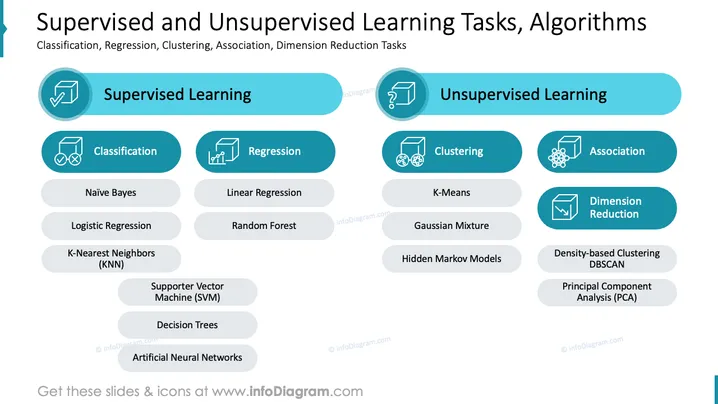
The PowerPoint slide presents a comparison between supervised and unsupervised learning tasks and algorithms. Supervised learning is associated with Classification, including algorithms like Naïve Bayes, Logistic Regression, K-Nearest Neighbors (KNN), Supporter Vector Machine (SVM), Decision Trees, and Artificial Neural Networks. Regression includes Linear Regression and Random Forest. Unsupervised learning covers Clustering with K-Means and Gaussian Mixture algorithms, and Association. Dimension Reduction features Density-based Clustering DBSCAN and Principal Component Analysis (PCA).
The slide has a polished, professional appearance, using color coding and iconography to define and differentiate learning tasks and associated algorithms. The layout is clean and well-balanced, facilitating easy comparisons between different types of learning.



