

Your graphics add a nice touch to my presentations and I recently used them for one of my all-hands meetings. Your toolbox adds professionalism to my slides. Instead of using standard clipart.
Claude Jones, Director of Engineer, @Walmartlabs, USA

Your graphics add a nice touch to my presentations and I recently used them for one of my all-hands meetings. Your toolbox adds professionalism to my slides. Instead of using standard clipart.
Claude Jones, Director of Engineer, @Walmartlabs, USA
I needed a fresh look at some of my slides. I've tried to find a way to create a paintbrush effect, to underline, accentuate, add some color and the handwritten markers were just the things. Very easy to use, easy to size, change the color. It was an affordable, perfect solution and I'm happy to recommend it.
Anonymous, US
The crisp, clean look of the graphics, and the fact that it allowed me to easily edit and change the colors to match the template was my main reason for purchasing them.
Brandie Jenkins, E-learning Developer, USA
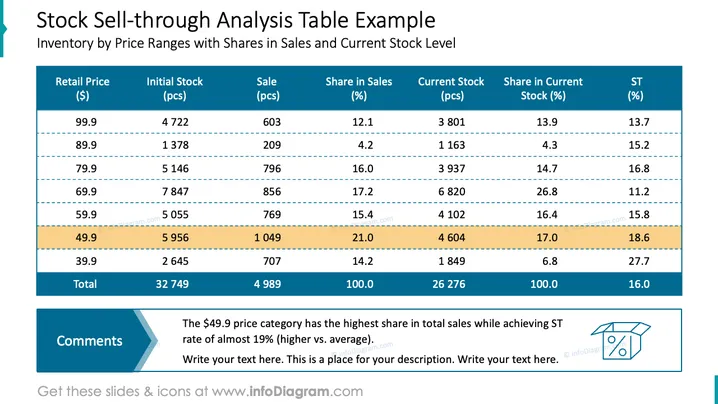
This PowerPoint slide titled "Stock Sell-through Analysis Table Example" provides a detailed analysis of inventory based on price ranges, including measures such as initial stock, sales volume, and current stock levels, as well as the percentage of share in sales and current stock. The slide shows that different price points have varying sell-through rates, with the $49.9 price point having the highest share in total sales and an ST (Sell Through) rate indicating performance above the average. Each price point offers insight into consumer preferences and inventory management effectiveness.
The overall look of the slide is clean and professional, with clear demarcation of data and an emphasis on crucial figures. The contrasting colors and systematic layout facilitate quick comprehension of the complex data presented.



