Reviews
Vos graphiques ajoutent une belle touche à mes présentations et je les ai récemment utilisés pour l'une de mes réunions générales. Votre boîte à outils ajoute du professionnalisme à mes diapositives. Au lieu d'utiliser des cliparts standards.
J'avais besoin d'un nouveau regard sur certaines de mes diapositives. J'ai essayé de trouver un moyen de créer un effet de pinceau, de souligner, d'accentuer, d'ajouter de la couleur et les marqueurs manuscrits étaient exactement ce qu'il fallait. Très facile à utiliser, facile à ajuster la taille, à changer la couleur. C'était une solution abordable et parfaite et je suis heureux de la recommander.
L'aspect net et épuré des graphiques, et le fait qu'il m'ait permis d'éditer et de changer facilement les couleurs pour les adapter au modèle, ont été les principales raisons de mon achat.
Description
Monthly Timeline Spiral Diagram Template – Toned Colors
Slide Content
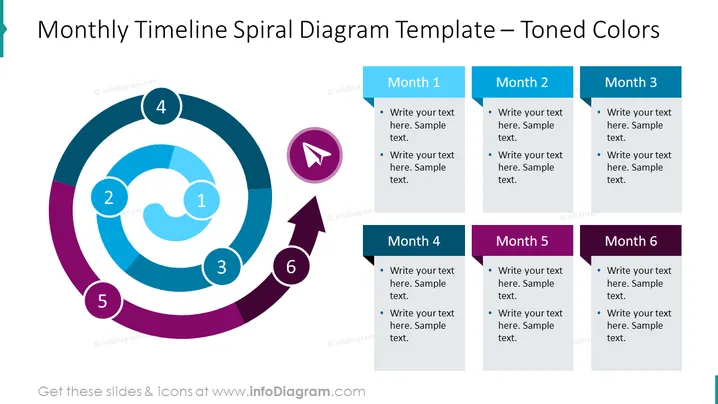
This PowerPoint slide is titled "Monthly Timeline Spiral Diagram Template – Toned Colors," depicting a 6-month timeline using a spiral graphic. Each segment of the spiral represents a month, indicated by numbers 1 through 6, and there are corresponding text boxes to the right of the spiral with titles "Month 1" to "Month 6." Bullet points under each month title suggest the insertion of customizable text. This format is especially conducive to describing projects with a half-year timeframe, breaking down phases, or setting milestones and goals.
Graphical Look
- The slide background color is white.
- On the left side, there is a circular spiral graphic divided into six segments, with tones of blue, purple, and maroon, numbered sequentially from 1 to 6.
- Each segment is connected by an arrow that follows the spiral's curving shape, indicating the flow of time or progress.
- The numbers within the spiral are encased in circles with a bold outline corresponding to the segment's color.
- To the right of the spiral are six rectangular shapes with rounded corners, each representing a month and aligned with their respective segment in the spiral.
- The rectangular shapes vary in the same color palette as the spiral and contain white space for text, along with bullet points for detailed entries.
- A cursor icon is situated within the fifth segment, suggestive of a point of interaction or a particular focus within the timeline.
The overall slide combines a clean, modern visual with a dynamic, flowing timeline designed to emphasize the progression of time through distinct color blocks. The synchronization between the graphical spiral and the descriptive text boxes creates a cohesive and intuitive representation of a timeline.
Use Cases
- Presenting project timelines or roadmaps during business meetings to convey progress over a specific half-year period.
- Showcasing marketing campaign plans, with each month delineating a particular campaign phase or set of activities.
- Reporting on past performance or milestones achieved in different months during a semiannual review.
- Illustrating a step-by-step guide for a process or strategy over a six-month timeframe in training presentations or workshops.
How to Edit
How to edit text & colors

How to expand / shorten diagram

How to Replace Icons in infoDiagram PPT


