Reviews
Sus gráficos añaden un toque agradable a mis presentaciones y recientemente los usé para una de mis reuniones generales. Su conjunto de herramientas añade profesionalismo a mis diapositivas. En lugar de usar imágenes prediseñadas estándar.
Necesitaba un aspecto fresco para algunas de mis diapositivas. Había intentado encontrar una forma de crear un efecto de pincel, de subrayar, acentuar, añadir algo de color y los marcadores escritos a mano fueron justo lo que necesitaba. Muy fácil de usar, fácil de ajustar el tamaño, cambiar el color. Fue una solución asequible y perfecta, y estoy feliz de recomendarla.
El aspecto nítido y limpio de los gráficos, y el hecho de que me permitiera editar y cambiar fácilmente los colores para que coincidieran con la plantilla fue mi principal razón para comprarlos.
Description
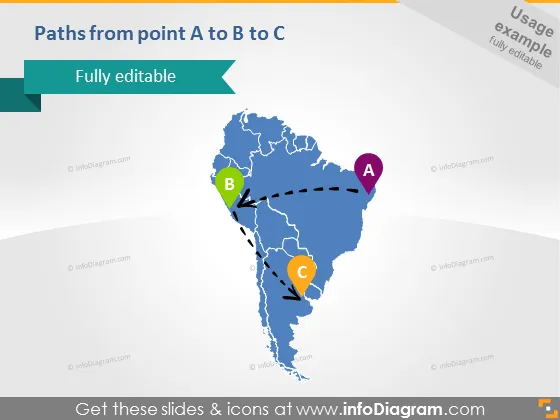
Paths from point A to B to C
Slide Content
The slide shows a conceptual journey or process moving from point A to point B and then to point C, illustrated using a stylized map. Point A is marked with a circular purple icon, Point B with a green icon, and Point C with an orange icon. Dotted lines with arrows indicate the direction of movement from A to B and then to B to C, suggesting a sequential progression or pathway that might represent stages, milestones, or locations in a process.
Graphical Look
- The slide features a large, light-blue silhouette of a stylized map, possibly representing South America.
- Dotted lines connect three circular icons labeled A, B, and C with arrows, showing a path from A to B to C.
- The icons for points A, B, and C are prominent, with each having a distinct color: purple, green, and orange respectively.
- The title of the slide, "Paths from point A to B to C," is positioned in the upper left corner, in white text against a dark background.
- The background of the slide is a gradient from white to pale blue at the bottom edge.
- A banner-like object with the text "Fully editable" is found below the slide title, designed with a modern folded look.
The slide is very visually appealing with a clean design. The usage of the map and colored icons makes it easy to understand the concept of progression or navigation from one point to another.
Use Cases
- Illustrating the steps involved in a logistics or supply chain management from origin to destination.
- Presenting the progression of a project with key phases or milestones.
- Explaining a strategic plan or roadmap for business expansion, including targeted regions or markets.
- Outlining a journey or itinerary for a travel-related presentation, showing key stopovers or destinations.
How to Edit
How to edit text & colors

How to expand / shorten diagram

How to Replace Icons in infoDiagram PPT


