Reviews
Sus gráficos añaden un toque agradable a mis presentaciones y recientemente los usé para una de mis reuniones generales. Su conjunto de herramientas añade profesionalismo a mis diapositivas. En lugar de usar imágenes prediseñadas estándar.
Necesitaba un aspecto fresco para algunas de mis diapositivas. Había intentado encontrar una forma de crear un efecto de pincel, de subrayar, acentuar, añadir algo de color y los marcadores escritos a mano fueron justo lo que necesitaba. Muy fácil de usar, fácil de ajustar el tamaño, cambiar el color. Fue una solución asequible y perfecta, y estoy feliz de recomendarla.
El aspecto nítido y limpio de los gráficos, y el hecho de que me permitiera editar y cambiar fácilmente los colores para que coincidieran con la plantilla fue mi principal razón para comprarlos.
Description
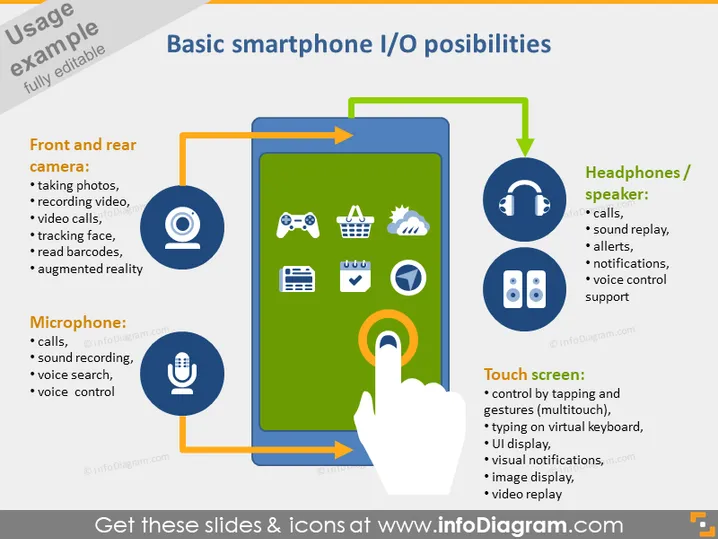
Basic smartphone I/O possibilities
Slide Content
The PowerPoint slide titled "Basic smartphone I/O possibilities" outlines the input/output features of smartphones. It explains how smartphones utilize front and rear cameras for tasks like taking photos, video recording, and augmented reality; microphones for calls, sound recording, and voice control; headphones/speakers for calls, sound playback, and voice control support; and touch screens for multi-touch gestures, typing, and video replay. Each feature is highlighted with an icon and a brief explanation of its function, emphasizing the multifaceted capabilities of modern smartphones.
Graphical Look
- The slide has a large, bold title at the top in dark text.
- There are four main circular icons, each accompanied by a text box on the left and right, describing different smartphone features.
- The central graphic is a stylized smartphone outline with a hand touching the screen, illustrating the touch screen feature.
- Arrows connect the icons to the central smartphone graphic, showing the direction of input and output.
- Each icon is distinct and represents the feature it describes: a camera for photography, a microphone for audio input, headphones for audio output, and a hand gesture for touch interaction.
- The color scheme includes shades of blue, orange, and green, which are vibrant and create a clear contrast against the white text and icons.
The slide is visually engaging and utilizes color coding and directional arrows to effectively demonstrate the relationship between various smartphone functionalities and their respective icons.
Use Cases
- Introducing the features of a new smartphone model in a product launch presentation.
- Training sessions for sales teams to understand and explain the technology to potential customers.
- Educational purposes, such as explaining the technology behind smartphones to students.
- Marketing presentations to highlight the advantages and versatility of smartphone technology to investors or partners.
How to Edit
How to edit text & colors

How to expand / shorten diagram

How to Replace Icons in infoDiagram PPT


