Your graphics add a nice touch to my presentations and I recently used them for one of my all-hands meetings. Your toolbox adds professionalism to my slides. Instead of using standard clipart.
Claude Jones, Director of Engineer, @Walmartlabs, USA
Your graphics add a nice touch to my presentations and I recently used them for one of my all-hands meetings. Your toolbox adds professionalism to my slides. Instead of using standard clipart.
Claude Jones, Director of Engineer, @Walmartlabs, USA
I needed a fresh look at some of my slides. I've tried to find a way to create a paintbrush effect, to underline, accentuate, add some color and the handwritten markers were just the things. Very easy to use, easy to size, change the color. It was an affordable, perfect solution and I'm happy to recommend it.
Anonymous, US
The crisp, clean look of the graphics, and the fact that it allowed me to easily edit and change the colors to match the template was my main reason for purchasing them.
Brandie Jenkins, E-learning Developer, USA
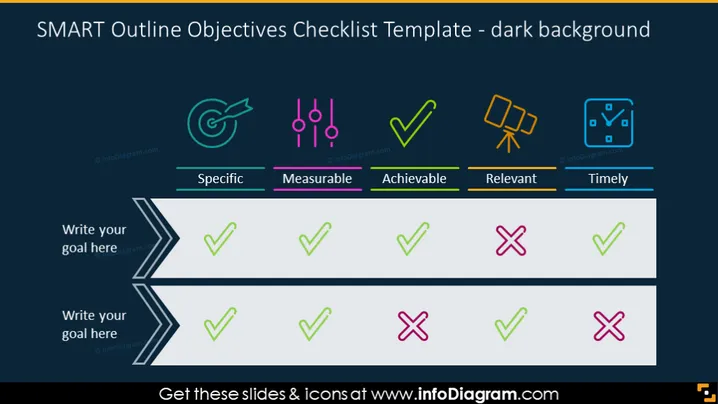
The slide presents a checklist template for evaluating goals or objectives using the SMART criteria. SMART stands for Specific, Measurable, Achievable, Relevant, and Timely, which are the categories listed along the top of the checklist. Each criterion has a corresponding brightly colored icon, drawing attention to the individual categories. Below the criteria, there are spaces provided to write down goals and to mark them with colored checkboxes to indicate whether each criterion is met, partially met, or not met for the goal stated. This format is designed to systematically review objectives to ensure they are well-defined and actionable.
The slide is visually clear and well-organized, with a strong color contrast that makes the content stand out. The use of icons and color-coded check marks aids in quickly conveying the evaluation status of goals relative to the SMART criteria.




