Reviews
Sus gráficos añaden un toque agradable a mis presentaciones y recientemente los usé para una de mis reuniones generales. Su conjunto de herramientas añade profesionalismo a mis diapositivas. En lugar de usar imágenes prediseñadas estándar.
Necesitaba un aspecto fresco para algunas de mis diapositivas. Había intentado encontrar una forma de crear un efecto de pincel, de subrayar, acentuar, añadir algo de color y los marcadores escritos a mano fueron justo lo que necesitaba. Muy fácil de usar, fácil de ajustar el tamaño, cambiar el color. Fue una solución asequible y perfecta, y estoy feliz de recomendarla.
El aspecto nítido y limpio de los gráficos, y el hecho de que me permitiera editar y cambiar fácilmente los colores para que coincidieran con la plantilla fue mi principal razón para comprarlos.
Description
SMART Goals Definitions Template
Slide Content
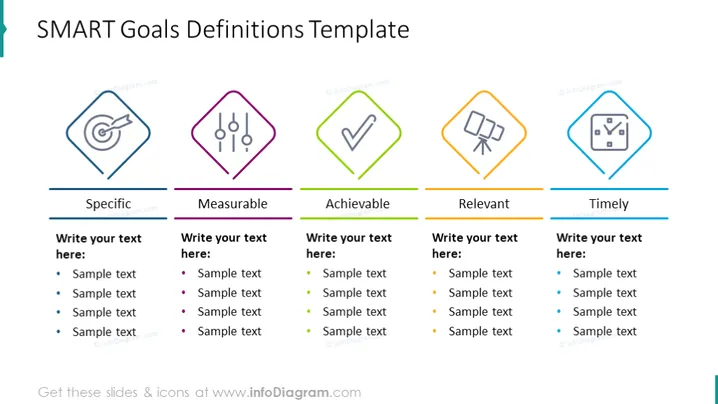
The slide is titled "SMART Goals Definitions Template" and presents the five components of SMART goals: Specific, Measurable, Achievable, Relevant, and Timely. Each component has a dedicated space where one can write explanations or examples. Specific goals are clearly defined with no ambiguity. Measurable goals have criteria for measuring progress. Achievable goals are realistic and attainable. Relevant goals align with broader objectives. Timely goals have a clearly defined timeline.
Graphical Look
- The title of the slide is in a large, bold font, positioned at the top.
- Five colorful icons, each within a distinct geometric shape—circle, diamond, pentagon, hexagon, and octagon—symbolize the SMART criteria.
- The icons are horizontally aligned and equally spaced across the upper part of the slide.
- Each icon is accompanied by a title for the respective SMART criteria directly below it in capitalized letters and underlined by a colored line matching the icon's outline.
- Under each criteria title, there is a text box with placeholder text "Write your text here:" followed by bulleted "Sample text" items.
- The background of the slide is white, providing a clean and uncluttered look.
The overall look of the slide is professional and colorful, with a well-organized layout that simplifies the presentation of information. The use of distinct colors and shapes for each criterion creates visual segregation and enhances readability.
Use Cases
- During a strategic planning session to outline objectives that are aligned with the SMART framework.
- In a project management meeting to set and discuss project goals and expectations with the team.
- For personal development workshops to teach participants how to set effective and achievable personal goals.
- In a performance review to clarify and review goals that an employee is expected to reach within a specific period.
How to Edit
How to edit text & colors

How to expand / shorten diagram

How to Replace Icons in infoDiagram PPT


