Reviews
Sus gráficos añaden un toque agradable a mis presentaciones y recientemente los usé para una de mis reuniones generales. Su conjunto de herramientas añade profesionalismo a mis diapositivas. En lugar de usar imágenes prediseñadas estándar.
Necesitaba un aspecto fresco para algunas de mis diapositivas. Había intentado encontrar una forma de crear un efecto de pincel, de subrayar, acentuar, añadir algo de color y los marcadores escritos a mano fueron justo lo que necesitaba. Muy fácil de usar, fácil de ajustar el tamaño, cambiar el color. Fue una solución asequible y perfecta, y estoy feliz de recomendarla.
El aspecto nítido y limpio de los gráficos, y el hecho de que me permitiera editar y cambiar fácilmente los colores para que coincidieran con la plantilla fue mi principal razón para comprarlos.
Description
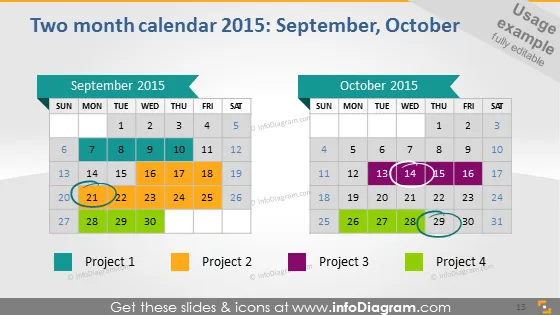
Two month calendar 2015: September, October
Slide Content
The PowerPoint slide is a visual representation of a two-month calendar for September and October 2015. It displays the two months side by side with dates laid out in standard calendar format. Key dates are highlighted by circles and squares to indicate different projects or events. There are four colored legends at the bottom of the slide indicating Project 1 (green), Project 2 (orange), Project 3 (purple), and Project 4 (blue), each color corresponds to markings on specific dates in the calendar, suggesting project timelines or important milestones.
Graphical Look
- The slide has a clean, flat design with a white background.
- Two separate calendar grids are displayed, one for each month, with the weekdays labeled at the top.
- Colored shapes (circle and square) are used to highlight specific dates.
- There are four rectangular color-coded legend keys at the bottom.
- The legend keys have a drop shadow effect.
- The text is modern and sans-serif, facilitating readability.
- The date numbers within the calendars have a bold font weight.
- The slide employs a limited color palette - shades of blue, green, orange, purple, and gray.
The overall look of the slide is professional and aesthetically pleasing, with a clear emphasis on visual organization. Color-coding makes it easy to correlate project timelines with specific dates.
Use Cases
- Planning and illustrating project timelines during a business meeting.
- Highlighting important company events or deadlines in a corporate presentation.
- Coordinating interdepartmental activities by showcasing overlapping tasks and responsibilities.
- Analyzing past project performance or timelines in a retrospective review meeting.
How to Edit
How to edit text & colors

How to expand / shorten diagram

How to Replace Icons in infoDiagram PPT


