Reviews
Sus gráficos añaden un toque agradable a mis presentaciones y recientemente los usé para una de mis reuniones generales. Su conjunto de herramientas añade profesionalismo a mis diapositivas. En lugar de usar imágenes prediseñadas estándar.
Necesitaba un aspecto fresco para algunas de mis diapositivas. Había intentado encontrar una forma de crear un efecto de pincel, de subrayar, acentuar, añadir algo de color y los marcadores escritos a mano fueron justo lo que necesitaba. Muy fácil de usar, fácil de ajustar el tamaño, cambiar el color. Fue una solución asequible y perfecta, y estoy feliz de recomendarla.
El aspecto nítido y limpio de los gráficos, y el hecho de que me permitiera editar y cambiar fácilmente los colores para que coincidieran con la plantilla fue mi principal razón para comprarlos.
Description
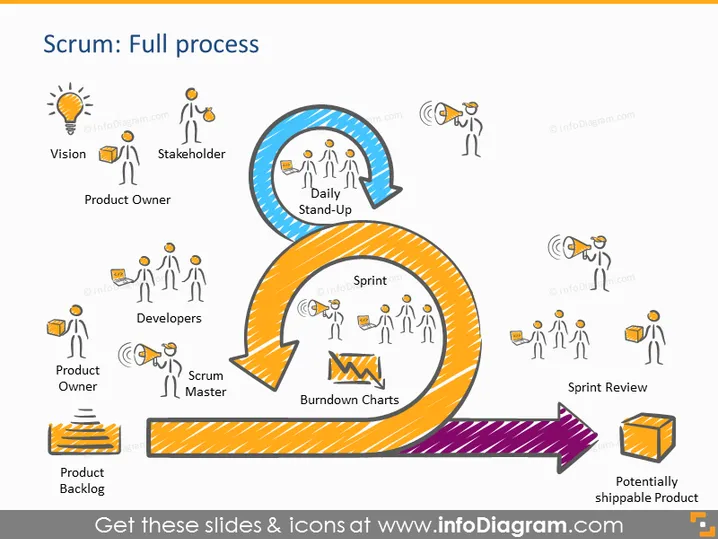
Scrum: Full process
Slide Content
This PowerPoint slide visually represents the Scrum framework, detailing its flow from conception to completion. At the start, a lightbulb icon labelled "Vision" signifies the inception of an idea. "Stakeholder" and "Product Owner" come next, depicting those responsible for the vision. The "Daily Stand-Up" is a circular arrow highlighting regular team check-ins. The "Developers," "Scrum Master," and "Burndown Charts" denote the active work phase, with the Scrum Master facilitating and Burndown Charts tracking progress. The process ends with a "Sprint Review" and a "Potentially shippable Product," suggesting a cycle ready to repeat for continuous improvement.
Graphical Look
- The slide uses a bright, color-coded scheme to differentiate various stages of the Scrum process.
- A series of eight icons, each accompanied by a brief label, are interconnected by arrows forming a loop, indicative of the Scrum process's cyclical nature.
- Icons are simple line drawings of people and objects: a lightbulb for "Vision," human figures for roles like "Stakeholder" and "Scrum Master," and charts or objects for "Burndown Charts" and "Potentially shippable Product."
- A large circular arrow in blue surrounds the "Daily Stand-Up" section, while an orange arrow guides the flow from "Sprint" to "Sprint Review."
- A purple diagonal arrow points to the final stage, labeled "Potentially shippable Product," suggesting forward movement towards a goal.
The slide has a clean and vibrant appearance, utilizing colors and shapes to guide viewers through the Scrum process. Icons are clear and effectively communicate the role or concept they represent.
Use Cases
- Introducing the Scrum methodology to teams new to Agile practices, providing a clear visual roadmap.
- Refreshing the Scrum process for existing Agile teams during workshops or training sessions, to reinforce understanding.
- Explaining project flow to stakeholders or clients unfamiliar with Scrum to set expectations about the development process.
- Reviewing and assessing the efficiency of a team's Scrum process during retrospective meetings to identify areas for improvement.
How to Edit
How to edit text & colors

How to expand / shorten diagram

How to Replace Icons in infoDiagram PPT


