

Your graphics add a nice touch to my presentations and I recently used them for one of my all-hands meetings. Your toolbox adds professionalism to my slides. Instead of using standard clipart.
Claude Jones, Director of Engineer, @Walmartlabs, USA

Your graphics add a nice touch to my presentations and I recently used them for one of my all-hands meetings. Your toolbox adds professionalism to my slides. Instead of using standard clipart.
Claude Jones, Director of Engineer, @Walmartlabs, USA
I needed a fresh look at some of my slides. I've tried to find a way to create a paintbrush effect, to underline, accentuate, add some color and the handwritten markers were just the things. Very easy to use, easy to size, change the color. It was an affordable, perfect solution and I'm happy to recommend it.
Anonymous, US
The crisp, clean look of the graphics, and the fact that it allowed me to easily edit and change the colors to match the template was my main reason for purchasing them.
Brandie Jenkins, E-learning Developer, USA
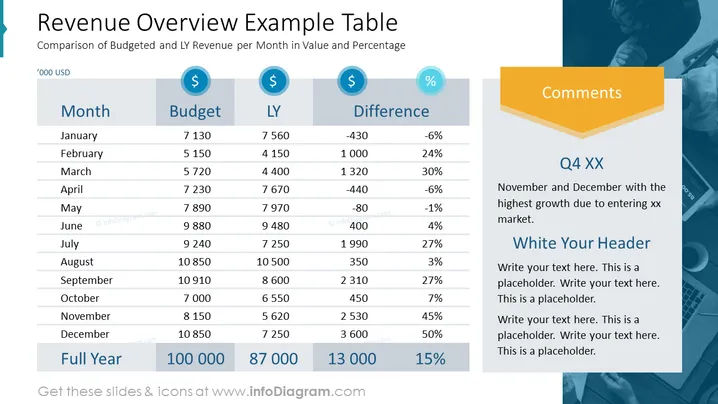
The PowerPoint slide is titled "Revenue Overview Example Table" and compares budgeted and Last Year (LY) revenue per month, both in value and percentage. The table lists each month with corresponding budgeted and LY revenue figures, along with the calculated differences in thousands of USD. Notable points are highlighted, such as the highest growth in November and December attributed to entering a new market. The right section titled "Comments" contains placeholder text for additional explanations.
The slide is designed with a professional and clean aesthetic, incorporating a balance of colors and icons to emphasize key financial data. The alternating row colors and distinct summary row enhance readability.



