Reviews
Sus gráficos añaden un toque agradable a mis presentaciones y recientemente los usé para una de mis reuniones generales. Su conjunto de herramientas añade profesionalismo a mis diapositivas. En lugar de usar imágenes prediseñadas estándar.
Necesitaba un aspecto fresco para algunas de mis diapositivas. Había intentado encontrar una forma de crear un efecto de pincel, de subrayar, acentuar, añadir algo de color y los marcadores escritos a mano fueron justo lo que necesitaba. Muy fácil de usar, fácil de ajustar el tamaño, cambiar el color. Fue una solución asequible y perfecta, y estoy feliz de recomendarla.
El aspecto nítido y limpio de los gráficos, y el hecho de que me permitiera editar y cambiar fácilmente los colores para que coincidieran con la plantilla fue mi principal razón para comprarlos.
Description
Business Case: Presenting Solution Costs & Return % Statistics
Slide Content:
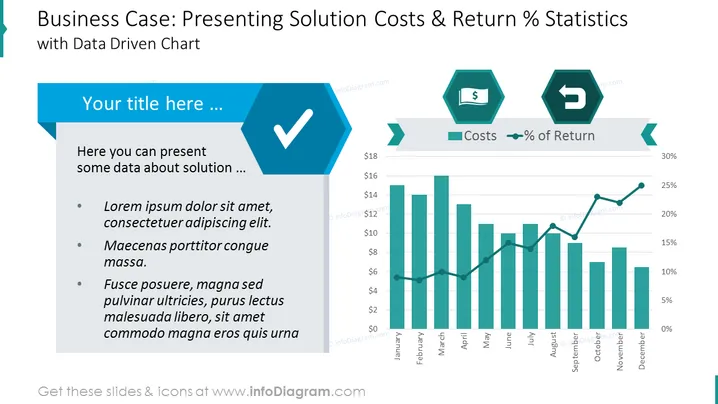
The PowerPoint slide is tailored for business presentations where the aim is to discuss the financial aspects of a solution, specifically its costs and the percentage of return. It features a section for text where the presenter can elaborate on details about the solution, supported by bullet points for structured information. This is complemented by a data-driven chart that visually contrasts costs against the percentage of return over time, illustrating the economic performance of the solution.
Graphical Look:
- A large blue hexagonal checkmark icon on the left, symbolizing task completion or approval.
- Two smaller hexagonal icons on the right, one with a dollar sign indicating costs and the other with a directional arrow representing return percentage.
- A dual-axis bar and line chart showing monthly costs and return percentage over a year.
The slide has a clean and professional appearance, using a consistent color palette and geometric shapes to create a visually organized and impactful presentation.
Use Cases:
- To present a cost-benefit analysis of a project during a business or stakeholder meeting.
- In financial reports to showcase the profitability and efficiency of a new business solution.
- During budget reviews to compare projected versus actual financial outcomes.
- For investment pitches to highlight the potential returns of a proposed venture.
How to Edit
How to edit text & colors

How to expand / shorten diagram

How to Replace Icons in infoDiagram PPT


