Reviews
Sus gráficos añaden un toque agradable a mis presentaciones y recientemente los usé para una de mis reuniones generales. Su conjunto de herramientas añade profesionalismo a mis diapositivas. En lugar de usar imágenes prediseñadas estándar.
Necesitaba un aspecto fresco para algunas de mis diapositivas. Había intentado encontrar una forma de crear un efecto de pincel, de subrayar, acentuar, añadir algo de color y los marcadores escritos a mano fueron justo lo que necesitaba. Muy fácil de usar, fácil de ajustar el tamaño, cambiar el color. Fue una solución asequible y perfecta, y estoy feliz de recomendarla.
El aspecto nítido y limpio de los gráficos, y el hecho de que me permitiera editar y cambiar fácilmente los colores para que coincidieran con la plantilla fue mi principal razón para comprarlos.
Description
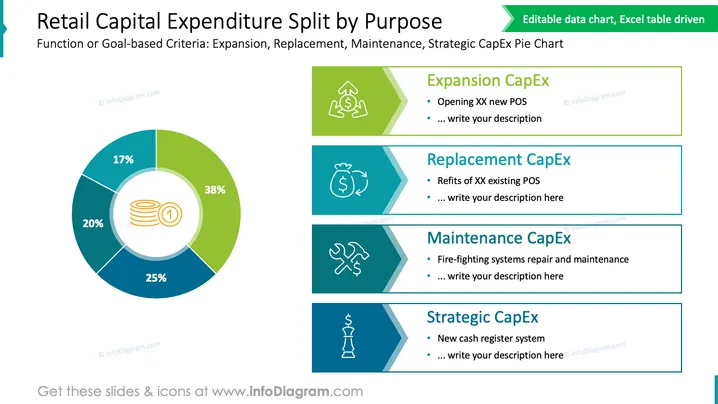
Retail Capital Expenditure Split by Purpose
Slide Content
The slide displays the breakdown of retail capital expenditure (CapEx) based on functional or goal-oriented criteria such as Expansion, Replacement, Maintenance, and Strategic expenditures. Expansion CapEx (38%) is for opening new points of sale (POS), Replacement CapEx (20%) refers to refits of existing POS, Maintenance CapEx (25%) covers repairs and maintenance such as fire-fighting systems, and Strategic CapEx (17%) includes significant investments like a new cash register system.
Graphical Look
- The slide has a large pie chart on the left side, using four different colors to represent different categories of expenditures.
- The central icon within the pie chart is a stack of coins, symbolizing capital expenditure.
- Percentage values are clearly labeled on each segment of the pie chart.
- There are four rectangular colored blocks to the right, each with a distinctive icon representing different types of expenditures.
- The colors of the rectangular blocks correspond to the colors in the pie chart segments for cohesive visual associations.
- Each block contains a placeholder text and provides a brief description or area to write more details.
- The icons within these blocks are a circulating arrow for Expansion, a money bag for Replacement, a wrench for Maintenance, and a trophy for Strategic.
The slide has a clean and professional look, with a well-organized layout that allows for easy interpretation of the data. The use of icons and color coordination aids in visually correlating the text descriptions with the pie chart segments.
Use Cases
- Presenting in a board meeting to discuss and justify budget allocations.
- Reporting in a financial review about how capital is being utilized in a retail business.
- Using in strategy sessions to identify areas of investment and potential cost-saving measures.
- Sharing with stakeholders or investors to provide an overview of capital usage and investment focuses.
How to Edit
How to edit text & colors

How to expand / shorten diagram

How to Replace Icons in infoDiagram PPT


