Reviews
Your graphics add a nice touch to my presentations and I recently used them for one of my all-hands meetings. Your toolbox adds professionalism to my slides. Instead of using standard clipart.
I needed a fresh look at some of my slides. I've tried to find a way to create a paintbrush effect, to underline, accentuate, add some color and the handwritten markers were just the things. Very easy to use, easy to size, change the color. It was an affordable, perfect solution and I'm happy to recommend it.
The crisp, clean look of the graphics, and the fact that it allowed me to easily edit and change the colors to match the template was my main reason for purchasing them.
Description
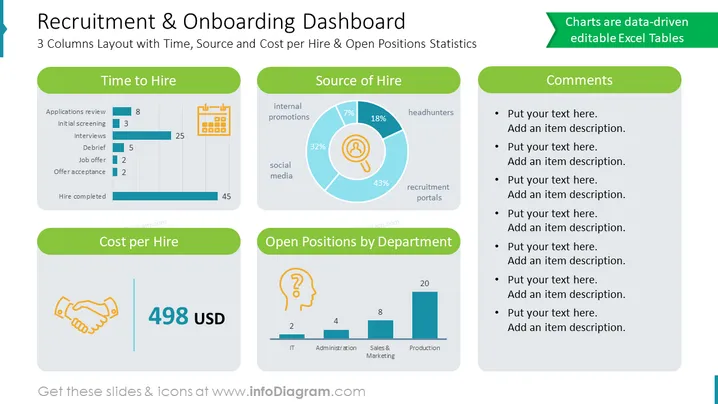
A Recruitment Dashboard is a collection of data-driven visuals to keep track of important recruitment metrics and KPIs. It's a useful way to communicate data for any organization that wants to improve its recruitment process. This recruitment dashboard template is an editable PPT version to present the data related to human resources recruitment statistics.
##Where To Use Recruitment Dashboard PowerPoint Template Update the data on the slide to keep track of the key metrics. The template can provide valuable insights into the effectiveness of your recruitment efforts for your audience. You can use the template for your various human resources presentations involving the recruitment topic. It can also be customized to fit the specific needs of your organization or branding.
##What Does This Recruitment Dashboard Include?
- 3 Data-driven Excel charts: 1 Pie chart, 2 bar charts.
- 4 Icons: Calendar, handshake, thinking, magnifying glass.
- Various diagrams and text boxes.
- White background.
- Source and cost per hire & open positions statistics.
- 3 columns layout with time.
This Recruitment Dashboard slide is a part of our HR Dashboards Template.
How to Edit
How to edit text & colors

How to expand / shorten diagram

How to Replace Icons in infoDiagram PPT


