Reviews
Your graphics add a nice touch to my presentations and I recently used them for one of my all-hands meetings. Your toolbox adds professionalism to my slides. Instead of using standard clipart.
I needed a fresh look at some of my slides. I've tried to find a way to create a paintbrush effect, to underline, accentuate, add some color and the handwritten markers were just the things. Very easy to use, easy to size, change the color. It was an affordable, perfect solution and I'm happy to recommend it.
The crisp, clean look of the graphics, and the fact that it allowed me to easily edit and change the colors to match the template was my main reason for purchasing them.
Description
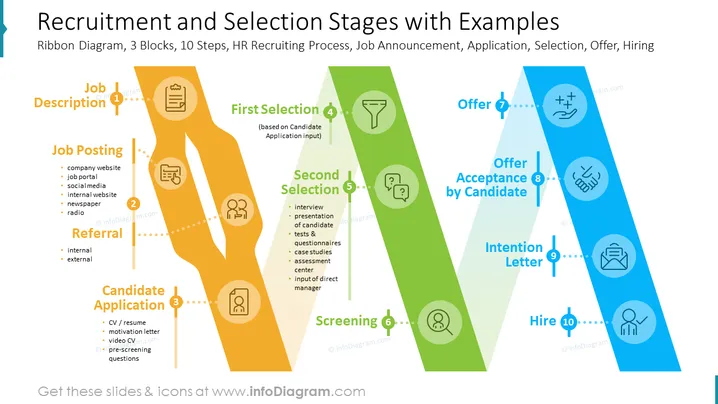
PowerPoint Slide description: HR Recruitment Process, Selection
The slide contains a Flow Chart Diagram with detailed descriptions of:
- CV Screening
- Assessment
- First Selection
- Candidate Application (CV/resume, motivation letter, video CV, pre-screening questions)
- Job Posting (Company website, job portal, social media, internal website, newspaper, radio)
- Referral (Internal, external)
- Offer
- Job Description
- Intention Letter
- Second Selection (Interview, presentation of candidate, tests & questionnaires, case studies, assessment center, input of direct manager)
- Screening
- Offer
- Acceptance by Candidate
Graphical look:
The slide has a modern and professional look, with a dark background and white text. The flow chart diagram is easy to follow and understand, with clear labels and arrows. The icons are simple and relevant, and they help to illustrate the different steps in the recruitment process.
Icons present on slide include:
- Job posting: A computer screen with a job posting on it.
- Referral: Two people connected by a line, representing a referral.
- Candidate application: A stack of papers, representing a candidate application.
- Screening: A magnifying glass, representing the screening process.
- Assessment: A test tube, representing the assessment process.
- First selection: A checkmark, representing the first selection of candidates.
- Second selection: A double checkmark, representing the second selection of candidates.
- Offer: A handshake, representing a job offer.
- Job description: A document with a job description on it.
- Intention letter: A document with an intention letter on it.
- Acceptance: A signature, representing the acceptance of a job offer.
How to Edit
How to edit text & colors

How to expand / shorten diagram

How to Replace Icons in infoDiagram PPT


