Reviews
Sus gráficos añaden un toque agradable a mis presentaciones y recientemente los usé para una de mis reuniones generales. Su conjunto de herramientas añade profesionalismo a mis diapositivas. En lugar de usar imágenes prediseñadas estándar.
Necesitaba un aspecto fresco para algunas de mis diapositivas. Había intentado encontrar una forma de crear un efecto de pincel, de subrayar, acentuar, añadir algo de color y los marcadores escritos a mano fueron justo lo que necesitaba. Muy fácil de usar, fácil de ajustar el tamaño, cambiar el color. Fue una solución asequible y perfecta, y estoy feliz de recomendarla.
El aspecto nítido y limpio de los gráficos, y el hecho de que me permitiera editar y cambiar fácilmente los colores para que coincidieran con la plantilla fue mi principal razón para comprarlos.
Description
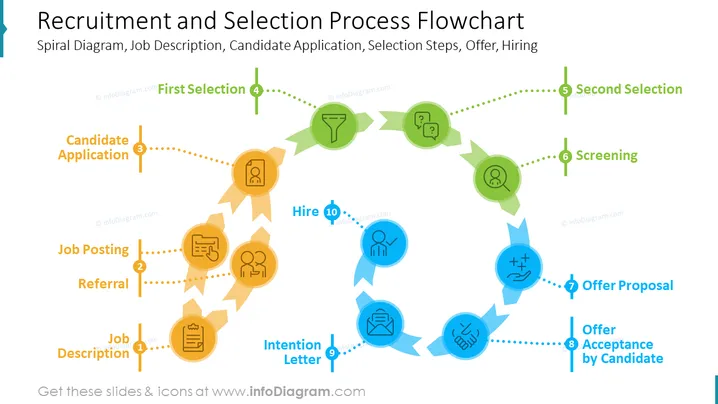
Slide: Recruitment and Selection Process Flowchart
The PowerPoint slide contains those items:
- Job Posting (Creating and publishing a job description on various platforms to attract candidates.)
- Candidate Application (Candidates submitting their resumes, cover letters, and other relevant documents.)
- Screening (Reviewing candidate applications to identify qualified candidates.)
- First Selection (Conducting initial interviews to select a smaller pool of candidates.)
- Second Selection (Conducting in-depth interviews and assessments to select the final candidate.)
- Offer (Extending a job offer to the selected candidate.)
- Hire (The candidate accepting the job offer and joining the company.)
Graphical Look of the slide
-
The slide has a modern, minimalist design with a white background and black text.
-
The recruitment and selection process flowchart is in the center of the slide and is represented by a spiral diagram with seven steps.
-
Each step of the flowchart is labeled with the corresponding text item from the slide.
-
There is a small icon next to each step of the flowchart to represent the activity involved.
-
There are several icons on the slide, one for each step of the recruitment and selection process flowchart.
-
The icons are:
- Job posting: A bullhorn icon
- Candidate application: A resume icon
- Screening: A magnifying glass icon
- First selection: A checkmark icon
- Second selection: A handshake icon
- Offer: A contract icon
- Hire: A person icon
How to Edit
How to edit text & colors

How to expand / shorten diagram

How to Replace Icons in infoDiagram PPT


