Reviews
Ihre Grafiken verleihen meinen Präsentationen eine nette Note, und ich habe sie kürzlich für eines meiner All-Hands-Meetings verwendet. Ihre Toolbox verleiht meinen Folien Professionalität, anstatt Standard-Clipart zu verwenden.
Ich brauchte einen neuen Blick auf einige meiner Folien. Ich habe versucht, einen Weg zu finden, einen Pinselschlag-Effekt zu erzielen, um zu unterstreichen, hervorzuheben, Farbe hinzuzufügen, und die handgeschriebenen Markierungen waren genau das Richtige. Sehr einfach zu bedienen, leicht in der Größe zu ändern, die Farbe zu ändern. Es war eine erschwingliche, perfekte Lösung und ich empfehle sie gerne weiter.
Die klare, saubere Optik der Grafiken und die Tatsache, dass ich die Farben leicht bearbeiten und an die Vorlage anpassen konnte, war mein Hauptgrund für den Kauf.
Description
Random Forest Illustration - Supervised Learning Algorithm
Slide Content
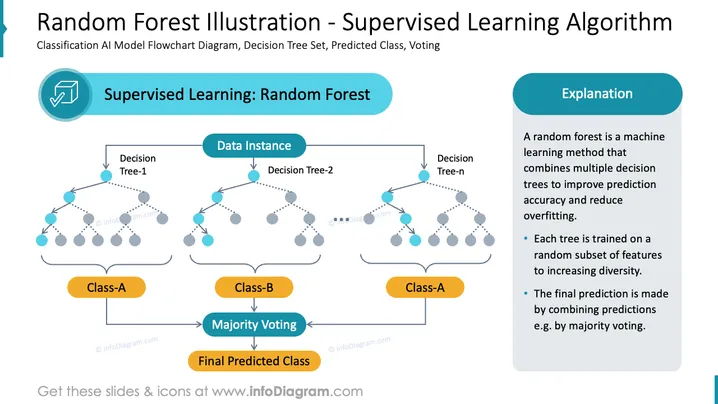
The slide illustrates the concept of the Random Forest algorithm in the context of supervised machine learning. Three decision trees are shown as examples of how a random forest aggregates multiple decision trees to classify data into two categories, Class-A and Class-B, through majority voting. It explains that Random Forest is a machine learning method which combines multiple decision trees to increase prediction accuracy and avoid overfitting, training each on a random subset of features and making the final prediction by majority voting.
Graphical Look
- A large header in dark teal that serves as the slide title.
- A subtitle in smaller font size below the slide title, providing context.
- A circular icon with a checkmark inside, symbolizing correctness or completion, followed by a title for the algorithm.
- Two rounded rectangular callout boxes with titles 'Supervised Learning: Random Forest' and 'Explanation' respectively.
- A flowchart with three columns, each representing a decision tree, using light blue circles connected by dotted lines to denote branching paths.
- Solid arrows between elements indicating the flow or sequence of operations.
- Two rounded rectangular shapes in orange, labeled 'Class-A' and 'Class-B,' which are the proposed outcomes.
- A shape labeled 'Majority Voting' and one for the 'Final Predicted Class', both connecting the trees' predictions to the final decision.
The slide has a clean, professional appearance with a color scheme of teal, light blue, and orange, giving it a balanced and visually clear layout. Icons and flowchart contribute to an intuitive representation of the algorithm's process.
Use Cases
- To explain the Random Forest algorithm in educational or training presentations on machine learning.
- During a technical conference presentation to showcase the mechanism of ensemble learning algorithms.
- In a proposal for a machine learning project to illustrate the methodology being proposed for data classification.
- Within a company's internal meeting to discuss adopting new machine learning techniques in their data analysis processes.
How to Edit
How to edit text & colors

How to expand / shorten diagram

How to Replace Icons in infoDiagram PPT


