Reviews
Ihre Grafiken verleihen meinen Präsentationen eine nette Note, und ich habe sie kürzlich für eines meiner All-Hands-Meetings verwendet. Ihre Toolbox verleiht meinen Folien Professionalität, anstatt Standard-Clipart zu verwenden.
Ich brauchte einen neuen Blick auf einige meiner Folien. Ich habe versucht, einen Weg zu finden, einen Pinselschlag-Effekt zu erzielen, um zu unterstreichen, hervorzuheben, Farbe hinzuzufügen, und die handgeschriebenen Markierungen waren genau das Richtige. Sehr einfach zu bedienen, leicht in der Größe zu ändern, die Farbe zu ändern. Es war eine erschwingliche, perfekte Lösung und ich empfehle sie gerne weiter.
Die klare, saubere Optik der Grafiken und die Tatsache, dass ich die Farben leicht bearbeiten und an die Vorlage anpassen konnte, war mein Hauptgrund für den Kauf.
Description
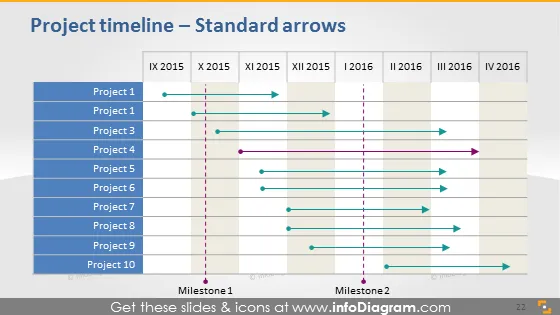
Project timeline – Standard arrows
Slide Content
This PowerPoint slide titled "Project timeline – Standard arrows" is designed to illustrate the timelines of different projects over two years, particularly focusing on their start and end points as well as key milestones. Projects 1 to 10 are listed on the left side, each with a distinct horizontal arrow pointing toward their respective end dates. Two vertical dotted lines marked "Milestone 1" and "Milestone 2" intersect these timelines, indicating significant points within the project schedules.
Graphical Look
- The slide has a clean, professional design with a white background.
- A bold header in dark blue color presents the slide title in a large font.
- A series of staggered blue bars on the left side list the project names (with a repetition of "Project 1", which likely indicates a typo).
- Quarters of the years 2021 and 2022 are labeled at the top in a grey grid-like table.
- Horizontal arrows in various shades of blue and one in purple extend from the project names and indicate the duration of each.
- Cylindrical markers are used to denote starting points and arrowheads for ending points.
- Two vertical dotted lines in pink represent milestones across the timeline.
The slide has a structured and straightforward visual layout with a clear color-coding system for easy interpretation of information.
Use Cases
- To outline the planned or actual timelines of multiple projects in a portfolio during management meetings.
- For visual tracking of project progress in status update presentations to stakeholders or team members.
- As a tool for project managers and planners to communicate important phases and deadlines in a visual format.
- In workshops or planning sessions to align team members on upcoming key dates and deliverables for various projects.
How to Edit
How to edit text & colors

How to expand / shorten diagram

How to Replace Icons in infoDiagram PPT


