Reviews
Your graphics add a nice touch to my presentations and I recently used them for one of my all-hands meetings. Your toolbox adds professionalism to my slides. Instead of using standard clipart.
I needed a fresh look at some of my slides. I've tried to find a way to create a paintbrush effect, to underline, accentuate, add some color and the handwritten markers were just the things. Very easy to use, easy to size, change the color. It was an affordable, perfect solution and I'm happy to recommend it.
The crisp, clean look of the graphics, and the fact that it allowed me to easily edit and change the colors to match the template was my main reason for purchasing them.
Description
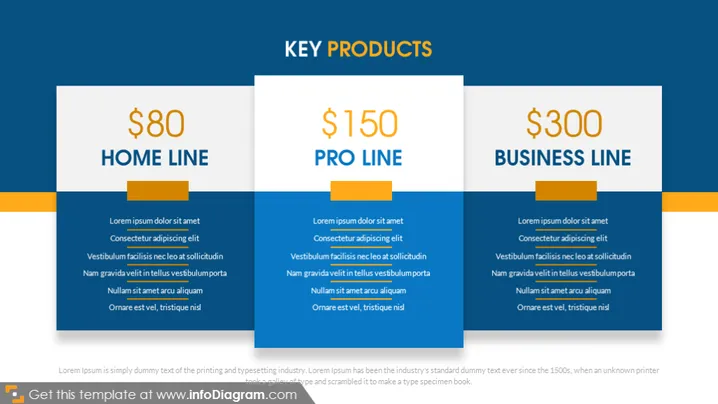
KEY PRODUCTS
Slide Content
The slide introduces three "KEY PRODUCTS" with tiered pricing: a Home Line for $80, a Pro Line for $150, and a Business Line for $300. Each product category includes a brief list of features or benefits, formatted with placeholder text (Lorem ipsum). The Home Line provides basic yet essential features for the average user, the Pro Line offers more advanced options for professional users, and the Business Line delivers the most comprehensive solutions for businesses requiring extensive services.
Graphical Look
- Three rectangular blocks with rounded corners, each representing a different product line.
- Each block has a main color theme: the Home Line is orange, the Pro Line is blue, and the Business Line is green.
- The top portion of each block features large dollar amounts denoting the price, followed by the product line names in capitalized and bold letters.
- Underneath the product names are horizontal dividers linked visually to a small square, which seem to symbolize tabs.
- Below each product name, placeholder text is used to simulate potential features or descriptions.
- The background of the slide is a muted dark gradient, which makes the colorful blocks stand out.
The slide has a clean and modern design. The use of color blocks with contrasting text ensures clear readability and adds visual hierarchy to present the product lines distinctly.
Use Cases
- Pitching to potential investors or clients to showcase different tiers of a product portfolio.
- Sales presentations to explain distinct features and value propositions of product categories.
- Internal company meetings to educate employees about the range of products on offer.
- Marketing presentations to introduce new products or services to the market, detailing pricing and key selling points.
How to Edit
How to edit text & colors

How to expand / shorten diagram

How to Replace Icons in infoDiagram PPT


