Reviews
Sus gráficos añaden un toque agradable a mis presentaciones y recientemente los usé para una de mis reuniones generales. Su conjunto de herramientas añade profesionalismo a mis diapositivas. En lugar de usar imágenes prediseñadas estándar.
Necesitaba un aspecto fresco para algunas de mis diapositivas. Había intentado encontrar una forma de crear un efecto de pincel, de subrayar, acentuar, añadir algo de color y los marcadores escritos a mano fueron justo lo que necesitaba. Muy fácil de usar, fácil de ajustar el tamaño, cambiar el color. Fue una solución asequible y perfecta, y estoy feliz de recomendarla.
El aspecto nítido y limpio de los gráficos, y el hecho de que me permitiera editar y cambiar fácilmente los colores para que coincidieran con la plantilla fue mi principal razón para comprarlos.
Description
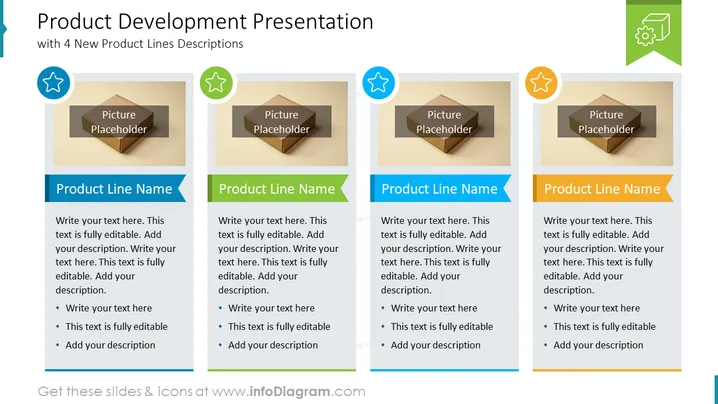
Product Development Presentation
with 4 New Product Lines Descriptions
Slide Content
The slide is designed to present information about four different product lines. Each section includes a picture placeholder, suggesting an image should be added to visually represent the product. Following this, there is a bolded 'Product Line Name', indicating where to name the product being described. The user is instructed to 'Write your text here', accompanied by three bullet points, implying a space for a brief description, features, or selling points about the product. These bullet points are editable, allowing for customization based on the specific details of each product line.
Graphical Look
- The slide background is a clean white color that provides a neutral base for the content.
- There are four distinct content blocks, each with a similar layout, aligned horizontally across the slide.
- Each content block has a colored icon in the upper-left corner: blue star, green gear, blue star, yellow star, respectively.
- Every content block contains a central image placeholder, with a three-dimensional effect, indicating where a custom picture can be inserted.
- Beneath each image placeholder is a ribbon-like shape in blue with white text that reads "Product Line Name."
- Below the ribbon, there is a text box for description, characterized by bullets for listing key points.
- Each section is separated by a thin grey line, enhancing the structure and organization of the slide.
- The overall color palette is soft, with the use of blues, greens, and yellows, giving the slide a professional yet approachable appearance.
The slide has a balanced and organized composition, with ample white space around each element, making it easy to read and visually appealing. The use of icons and color-coding helps to distinguish between the different product lines.
Use Cases
- Presenting a new product line to stakeholders, detailing different aspects of each product.
- Using in a marketing meeting to discuss the key features and benefits of new products.
- Including in a sales pitch to potential buyers or partners, showcasing a portfolio of products.
- Displaying at trade shows or conferences on a loop to visually engage visitors and provide information about products.
How to Edit
How to edit text & colors

How to expand / shorten diagram

How to Replace Icons in infoDiagram PPT


