Reviews
Sus gráficos añaden un toque agradable a mis presentaciones y recientemente los usé para una de mis reuniones generales. Su conjunto de herramientas añade profesionalismo a mis diapositivas. En lugar de usar imágenes prediseñadas estándar.
Necesitaba un aspecto fresco para algunas de mis diapositivas. Había intentado encontrar una forma de crear un efecto de pincel, de subrayar, acentuar, añadir algo de color y los marcadores escritos a mano fueron justo lo que necesitaba. Muy fácil de usar, fácil de ajustar el tamaño, cambiar el color. Fue una solución asequible y perfecta, y estoy feliz de recomendarla.
El aspecto nítido y limpio de los gráficos, y el hecho de que me permitiera editar y cambiar fácilmente los colores para que coincidieran con la plantilla fue mi principal razón para comprarlos.
Description
Portfolio of POS in Market X Dashboard
Slide Content
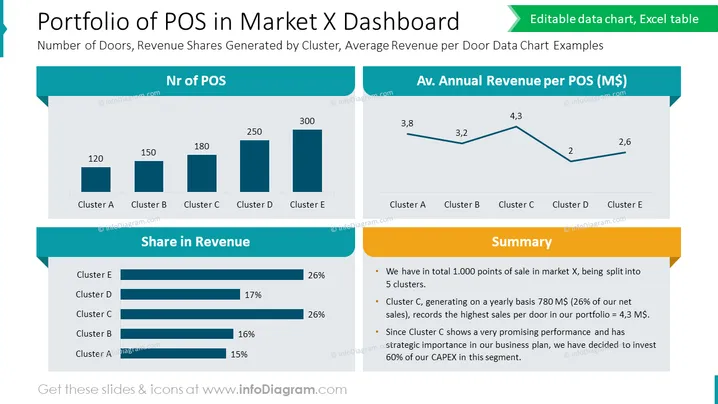
The slide titled "Portfolio of POS in Market X Dashboard" presents data on the distribution and financial performance of points of sale (POS) across different clusters in a market. It shows the "Number of Doors, Revenue Shares Generated by Cluster, Average Revenue per Door Data Chart Examples." The number of POS per cluster is illustrated in a bar chart for clusters A to E, suggesting the magnitude of operations in each cluster. Additionally, "Share in Revenue" is shown in horizontal bars, indicating Cluster E's dominance, being on par with Cluster D. A line graph depicts the "Av. Annual Revenue per POS (M$)," where Cluster C has the highest average revenue. Lastly, a "Summary" section highlights key insights: 1,000 total POS, Cluster C claiming a significant share of yearly sales, and plans to invest heavily in this promising segment.
Graphical Look
- The slide background is white, providing a clean and professional appearance.
- The title uses a bold, large font, catching immediate attention.
- Three distinct content sections with labels: 'Nr of POS', 'Av. Annual Revenue per POS (M$)', and 'Summary'.
- The first section includes a vertical bar chart with five bars, each corresponding to a cluster.
- The second section consists of a line graph tracking the average annual revenue across clusters.
- Both graphical sections are in shades of blue, providing a visually cohesive and calming effect.
- The 'Summary' section is accompanied by three points, enclosed in a text box with a golden yellow border.
- Icons and text boxes use rounded rectangles with a flat design.
- The slide employs a minimalistic approach, with icons and charts designed for easy interpretation.
The overall look of the slide is clean, modern, and data-focused, utilizing blue tones and yellow accents to draw attention to key metrics and summaries. These visual elements guide the viewer's eye through the data in a logical flow.
Use Cases
- To present sales performance data in a management meeting, highlighting which clusters are excelling and which may need more support.
- During a strategy presentation to stakeholders, illustrating market penetration and areas of revenue concentration.
- In a financial analysis discussion, to isolate areas of high performance and better understand revenue streams and investment effectiveness.
- When unveiling a business plan to investors, providing a snapshot of current market presence and guiding future investment decisions based on data-driven insights.
How to Edit
How to edit text & colors

How to expand / shorten diagram

How to Replace Icons in infoDiagram PPT


