

Your graphics add a nice touch to my presentations and I recently used them for one of my all-hands meetings. Your toolbox adds professionalism to my slides. Instead of using standard clipart.
Claude Jones, Director of Engineer, @Walmartlabs, USA

Your graphics add a nice touch to my presentations and I recently used them for one of my all-hands meetings. Your toolbox adds professionalism to my slides. Instead of using standard clipart.
Claude Jones, Director of Engineer, @Walmartlabs, USA
I needed a fresh look at some of my slides. I've tried to find a way to create a paintbrush effect, to underline, accentuate, add some color and the handwritten markers were just the things. Very easy to use, easy to size, change the color. It was an affordable, perfect solution and I'm happy to recommend it.
Anonymous, US
The crisp, clean look of the graphics, and the fact that it allowed me to easily edit and change the colors to match the template was my main reason for purchasing them.
Brandie Jenkins, E-learning Developer, USA
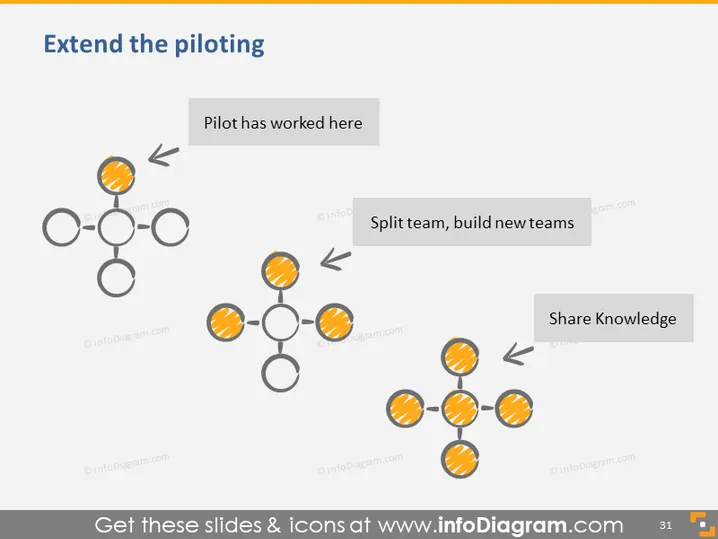
The PowerPoint slide titled "Extend the piloting" appears to illustrate a conceptual framework or strategy related to organizational development. It includes three key activities or stages represented by graphical clusters linked with arrows indicating progression. The first cluster "Pilot has worked here" suggests a completed pilot project. The second cluster "Split team, build new teams" illustrates the process of branching out or expanding from the original pilot by forming new groups. Finally, "Share Knowledge" indicates disseminating what has been learned across these new teams, emphasizing the transfer of insights or lessons learned from the original pilot.
The slide has a minimalist design with an effective use of color and pattern to highlight transitions and developments within an organizational context. The graphical elements are simple but purposeful, providing a straightforward visual representation of the process described.



