Reviews
Ihre Grafiken verleihen meinen Präsentationen eine nette Note, und ich habe sie kürzlich für eines meiner All-Hands-Meetings verwendet. Ihre Toolbox verleiht meinen Folien Professionalität, anstatt Standard-Clipart zu verwenden.
Ich brauchte einen neuen Blick auf einige meiner Folien. Ich habe versucht, einen Weg zu finden, einen Pinselschlag-Effekt zu erzielen, um zu unterstreichen, hervorzuheben, Farbe hinzuzufügen, und die handgeschriebenen Markierungen waren genau das Richtige. Sehr einfach zu bedienen, leicht in der Größe zu ändern, die Farbe zu ändern. Es war eine erschwingliche, perfekte Lösung und ich empfehle sie gerne weiter.
Die klare, saubere Optik der Grafiken und die Tatsache, dass ich die Farben leicht bearbeiten und an die Vorlage anpassen konnte, war mein Hauptgrund für den Kauf.
Description
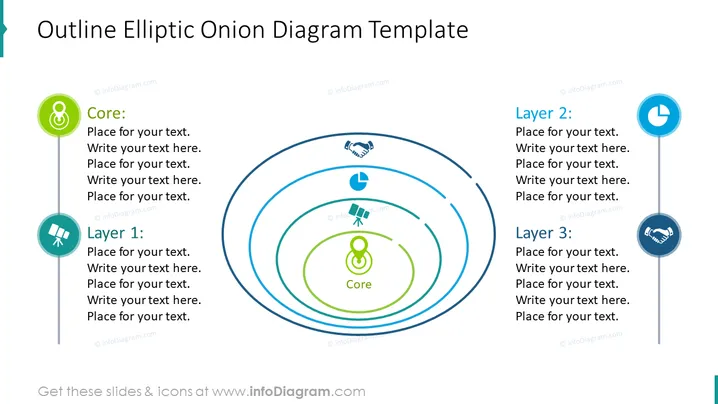
Outline Elliptic Onion Diagram Template
Slide Content
The slide presents an "Outline Elliptic Onion Diagram" which is a model used to illustrate layers of a concept or system, each encircling a central core idea. The core is highlighted by a distinct green color and is labeled "Core," followed by Layer 1, Layer 2, and Layer 3. Each layer is represented by a blue concentric ellipse and has a corresponding sidebar with icons and text placeholders which expand on the details that can be added to describe each component of the system.
Graphical Look
- The slide background is white, providing a clean and neutral backdrop.
- A bold title is placed at the top of the slide in a large, dark font.
- The diagram is composed of four elliptical, concentric shapes centered on the slide.
- Each ellipse is outlined in a light blue and increases in size from the center outwards.
- Adjacent to each ellipse, there are vertical bars with circular icons at the top signifying the layers.
- The icons for each layer are colored and stylized: a loop for the Core, a handshake for Layer 2, a bar chart for Layer 3, and two figures for Layer 1.
- To the right of each icon, there is a place for text, helping the user to add descriptions.
- There is also color coordination between the icons and the text of the associated layers.
The slide has a professional and modern look, with a minimalistic design that focuses on clarity and ease of understanding. The color scheme utilizes contrasting hues of blue and green to draw attention to specific areas.
Use Cases
- To explain a multi-layered business strategy, with each layer representing a different aspect or level of detail.
- In a product presentation, to discuss various features or components, starting from the core functionality outward.
- For educational purposes, to illustrate the composition of an ecosystem or a concept in science or social studies.
- During organizational training to visually represent the hierarchy of needs or progression stages in employee development or project milestones.
How to Edit
How to edit text & colors

How to expand / shorten diagram

How to Replace Icons in infoDiagram PPT


