Reviews
Your graphics add a nice touch to my presentations and I recently used them for one of my all-hands meetings. Your toolbox adds professionalism to my slides. Instead of using standard clipart.
I needed a fresh look at some of my slides. I've tried to find a way to create a paintbrush effect, to underline, accentuate, add some color and the handwritten markers were just the things. Very easy to use, easy to size, change the color. It was an affordable, perfect solution and I'm happy to recommend it.
The crisp, clean look of the graphics, and the fact that it allowed me to easily edit and change the colors to match the template was my main reason for purchasing them.
Description
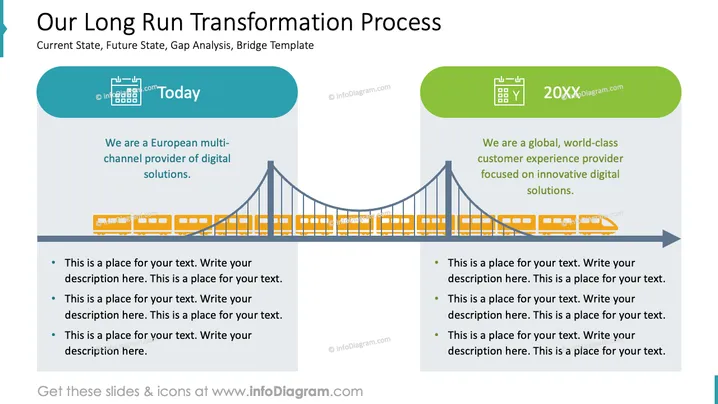
Our Long Run Transformation Process
Slide Content
The PowerPoint slide illustrates a concept titled "Our Long Run Transformation Process," focusing on a company's journey from its "Current State" to a "Future State." It mentions "Gap Analysis" and a "Bridge Template" as parts of the process. Two sections divide the slide—'Today' mentions the company being a European multi-channel digital solutions provider, and '20XX' talks about an aspiration to become a world-class customer experience provider aimed at innovative digital solutions. Bullet points beneath each section indicate placeholders for additional details to explain current operations and future goals.
Graphical Look
- The slide has a large header with the presentation's title in dark text.
- A graphical representation of a bridge connects two text blocks labeled "Today" and "20XX," symbolizing the journey from the present to the future.
- Each text block is housed in a pill-shaped, colored background – teal for "Today" and lime green for "20XX."
- Placeholder text sits below each header within these colored shapes, suggesting areas for custom information.
- Below the placeholder text, three bullet points indicate areas for further elaboration on the current state and future goals.
- The bridge is depicted in a golden color, spanning across the lower half of the slide, depicting a connection or transition.
- Each side of the bridge aligns with the corresponding text block, visually linking them to the representative time period.
The slide presents a clean, professional visual with a central metaphor of a bridge depicting the transformation from the present to a future state. The use of color to differentiate between "Today" and "20XX" provides a clear visual distinction between the current situation and future aspirations.
Use Cases
- To present a company's strategic plan, outlining the transformation from its current operations to future objectives.
- In a change management presentation, to illustrate the transition phases and interim milestones.
- During an investor pitch, to showcase the roadmap for growth and innovation over coming years.
- In internal company meetings for communicating long-term visions and the necessary steps to achieve them to the team members.
How to Edit
How to edit text & colors

How to expand / shorten diagram

How to Replace Icons in infoDiagram PPT


