Reviews
Ihre Grafiken verleihen meinen Präsentationen eine nette Note, und ich habe sie kürzlich für eines meiner All-Hands-Meetings verwendet. Ihre Toolbox verleiht meinen Folien Professionalität, anstatt Standard-Clipart zu verwenden.
Ich brauchte einen neuen Blick auf einige meiner Folien. Ich habe versucht, einen Weg zu finden, einen Pinselschlag-Effekt zu erzielen, um zu unterstreichen, hervorzuheben, Farbe hinzuzufügen, und die handgeschriebenen Markierungen waren genau das Richtige. Sehr einfach zu bedienen, leicht in der Größe zu ändern, die Farbe zu ändern. Es war eine erschwingliche, perfekte Lösung und ich empfehle sie gerne weiter.
Die klare, saubere Optik der Grafiken und die Tatsache, dass ich die Farben leicht bearbeiten und an die Vorlage anpassen konnte, war mein Hauptgrund für den Kauf.
Description
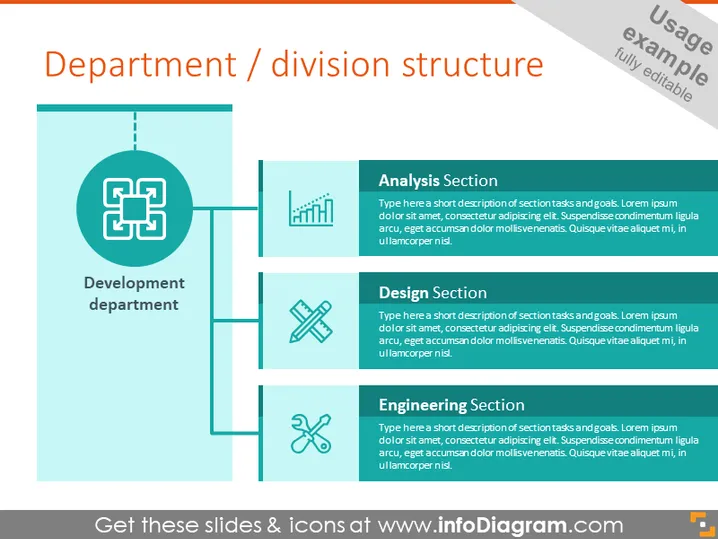
Department / division structure
Slide Content
The slide is a visual representation of a department or division structure, typically illustrating how different sections within an organization are connected. The main title is "Development department," indicating a focus on a specific area within the company. Accompanying this main title are three subsections: "Analysis Section," "Design Section," and "Engineering Section." Each section contains a placeholder text for a short description of the section's tasks and goals, intended to provide viewers with an understanding of the roles and responsibilities within each part of the department.
Graphical Look
- The slide's background is a light color with a visible grid pattern.
- A large teal rectangle is on the left side, with a darker outline and a smaller rectangle attached, oriented vertically.
- Inside the large rectangle, there's a complex, square-shaped icon in white, connected to the right by three lines leading to three smaller icons.
- Each subsidiary icon is paired with a rectangular text box: the first one has a graph icon representing the Analysis Section, the second a pencil and ruler for the Design Section, and the third a gear for the Engineering Section.
- The icons are teal with white accents and are followed by teal text boxes with headers in a bold sans-serif font.
- Placeholder text in each section is in a smaller, italicized font.
The slide has a clean, modern design with a professionally structured layout. The color scheme is consistent, utilizing teal and white to create a visually cohesive presentation of the department structure.
Use Cases
- Presenting the organizational structure during internal company meetings.
- Outlining department roles and responsibilities in new employee onboarding sessions.
- Illustrating departmental workflows to stakeholders or clients.
- Using as a template for departmental reports or strategy documents.
How to Edit
How to edit text & colors

How to expand / shorten diagram

How to Replace Icons in infoDiagram PPT


