

Your graphics add a nice touch to my presentations and I recently used them for one of my all-hands meetings. Your toolbox adds professionalism to my slides. Instead of using standard clipart.
Claude Jones, Director of Engineer, @Walmartlabs, USA

Your graphics add a nice touch to my presentations and I recently used them for one of my all-hands meetings. Your toolbox adds professionalism to my slides. Instead of using standard clipart.
Claude Jones, Director of Engineer, @Walmartlabs, USA
I needed a fresh look at some of my slides. I've tried to find a way to create a paintbrush effect, to underline, accentuate, add some color and the handwritten markers were just the things. Very easy to use, easy to size, change the color. It was an affordable, perfect solution and I'm happy to recommend it.
Anonymous, US
The crisp, clean look of the graphics, and the fact that it allowed me to easily edit and change the colors to match the template was my main reason for purchasing them.
Brandie Jenkins, E-learning Developer, USA
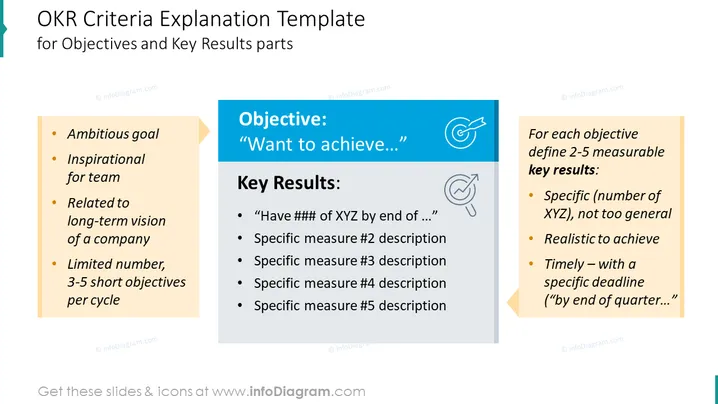
The slide outlines the criteria for setting Objectives and Key Results (OKRs). An objective should be an ambitious goal that is inspirational for the team and related to the company's long-term vision, with a limited number of 3-5 short objectives per cycle. Key Results should be 2-5 measurable outcomes, specific and not too general, realistic to achieve, and timely, with a specific deadline such as "by the end of the quarter."
The slide has a clean and professional design, using color blocks to separate different sections and icons to visually represent concepts. The use of bullet points and example placeholders makes the information easily digestible.
Such a slide is ideal for business presentations, especially during strategic planning meetings, quarterly business reviews, or team meetings where the focus is on setting and explaining OKR frameworks. It serves as an educational tool for teams unfamiliar with the OKR methodology or as a reminder for teams to align their objectives and results effectively.



