Reviews
Your graphics add a nice touch to my presentations and I recently used them for one of my all-hands meetings. Your toolbox adds professionalism to my slides. Instead of using standard clipart.
I needed a fresh look at some of my slides. I've tried to find a way to create a paintbrush effect, to underline, accentuate, add some color and the handwritten markers were just the things. Very easy to use, easy to size, change the color. It was an affordable, perfect solution and I'm happy to recommend it.
The crisp, clean look of the graphics, and the fact that it allowed me to easily edit and change the colors to match the template was my main reason for purchasing them.
Description
October (US)
Slide Content
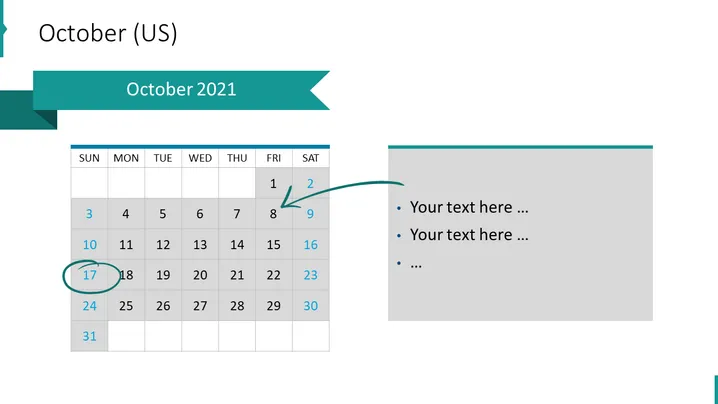
The slide presents "October 2021" and appears to be part of a calendar or schedule-related presentation. It features a calendar for the month of October 2021, with the days of the week labeled from Sunday to Saturday. Dates that have passed are shown in gray, and the current date and a highlighted date are encircled. On the right side, there are bullet points available for adding text, which would be ideal for describing events or notes corresponding to certain dates on the calendar.
Graphical Look
- The slide has a horizontal two-column layout with a calendar on the left and a text area on the right.
- The calendar is minimalistic with a white background and gray past dates.
- There are two dates circled in the calendar — one highlighted with a blue circle indicating a special event or current date, and an arrow pointing to one of the dates suggesting emphasis or importance.
- The right column has a gray background and contains three bullet points for adding custom text.
- The title ribbon on the top spans across both columns with a darker shade of teal and has a cutout arrow-like design on the right side.
The slide has a clean and professional look with a muted color scheme that focuses on organization and clarity. The balance between the calendar and the text area allows for a straightforward presentation of dates alongside corresponding notes or events.
Use Cases
- To outline key dates and deadlines in a business project timeline.
- For scheduling and presenting upcoming corporate events or holidays during a company meeting.
- To highlight important company milestones or launch dates in an investor update presentation.
- As an organizational tool within a training or educational session, indicating when certain modules or sessions will take place.
How to Edit
How to edit text & colors

How to expand / shorten diagram

How to Replace Icons in infoDiagram PPT


